When selecting a new computer monitor, you’re bombarded with specifications, from refresh rates to response times. Among these, “contrast ratio” often stands out, typically boasting numbers that range from thousands to millions. But what do these figures truly mean for your viewing experience, and what’s the difference between static and dynamic contrast ratio? Understanding these distinctions is crucial for anyone, from casual users to professional graphic designers and avid gamers, looking to make an informed decision about their display’s performance. This article will delve into the nuances of static versus dynamic contrast, helping you uncover which metric genuinely reflects a monitor’s picture quality and how it impacts your daily tasks.
What is Contrast Ratio?
At its core, contrast ratio defines the breadth of light and dark shades a display can produce. It is the numerical comparison between the brightest white and the darkest black a computer monitor is capable of rendering. A higher contrast ratio generally translates to a more vibrant, lifelike image with greater depth and detail, allowing you to discern subtle variations in both brilliant highlights and deep shadows.
The Basics of Light and Dark
|
Our Picks for the Best Computer Monitor in 2026
As an Amazon Associate I earn from qualifying purchases.
|
||
| Num | Product | Action |
|---|---|---|
| 1 | KOORUI 24-inch Computer Monitor Full HD 1920 x 1080p 100Hz VA Display 4000:1 Contrast Ratio with HDMI VGA, TÜV Rheinland Certified, 100 x 100 mm VESA Mountable, Ultra-Slim Design, Tilt, Black, E2412F |

|
| 2 | New! Sceptre 27-inch Gaming Monitor 100Hz 1ms DisplayPort HDMI x2 100% sRGB AMD FreeSync Build-in Speakers, Eye Care Frameless Machine Black 2025 (E275W-FW100T Series) |
|
| 3 | Philips 221V8LB 22 inch Class Thin Full HD (1920 x 1080) Monitor, 100Hz Refresh Rate, VESA, HDMI x1, VGA x1, LowBlue Mode, Adaptive Sync, 4 Year Advance Replacement Warranty |
|
| 4 | KOORUI 22 Inch Computer Monitor Full HD 1080P 100Hz PC Gaming Screen VA Panel Ultra-Slim Display 3000:1 Contrast Ratio with Adpitive Sync (HDMI/VGA/VESA Compatible 100x100mm/Audio Out), Tilt, Black |
|
| 5 | MNN Portable Monitor 15.6inch FHD 1080P USB C HDMI Gaming Ultra-Slim IPS Display w/Smart Cover & Speakers,HDR Plug&Play, External Monitor for Laptop PC Phone Mac (15.6\'\' 1080P) |
|
| 6 | Samsung 32-Inch Flat Computer Monitor, 75Hz, Borderless Display, AMD FreeSync, Game Mode, Advanced Eye Care, HDMI and DisplayPort, LS32B304NWNXGO, 2024 |
|
| 7 | Amazon Basics 24 Inch (23.8 inch viewable) Monitor, FHD 1080P, Max 100Hz, VESA Compatible, Built-in Speakers, Black |
|
| 8 | LG 24U411A-B 24-inch Full HD (1920 x 1080) IPS Computer Monitor, 120Hz, HDR10, Reader Mode, Flicker Safe, HDMI, Slim Stand Base, Black |
|
| 9 | acer 27 Inch Monitor- KB272-27 Inch FHD IPS (1920 x 1080) Display, Up to 120Hz Refresh Rate, 99% sRGB, Tilt, Adaptive-Sync Support (FreeSync Compatible) 1ms (VRB), HDMI & VGA Ports |
|
| 10 | Samsung 27\" Essential S3 (S36GD) Series FHD 1800R Curved Computer Monitor, 100Hz, Game Mode, Advanced Eye Comfort, HDMI and D-sub Ports, LS27D366GANXZA, 2024 |
|
Every pixel on your computer monitor emits or allows light to pass through to create an image. Contrast ratio quantifies the span between the maximum light output (pure white) and the minimum light output (pure black) the screen can achieve. Imagine a scene with both a blazing sun and a shadowy cave entrance; a high contrast ratio ensures both elements are displayed with clarity, preventing bright areas from looking washed out or dark areas from appearing as a murky grey.
Why Contrast Matters for Your Computer Monitor
A strong contrast ratio significantly enhances the overall visual quality of your monitor. For everyday tasks like reading text, it improves readability and reduces eye strain by ensuring sharp differentiation between characters and the background. In multimedia consumption, movies and photos appear more cinematic and engaging, with richer colors and profound blacks. For creative professionals, accurate contrast is indispensable for precise color grading and detail work, ensuring that what they see on screen is true to their artistic vision. Conversely, a monitor with a low contrast ratio makes images appear flat, colors less vivid, and fine details easily lost in both bright and dark scenes.
Static Contrast Ratio: The True Measure
Static contrast ratio, often referred to as native contrast, represents the inherent capability of a monitor’s panel to display the brightest white and the darkest black simultaneously within the same frame or image. This is considered the most honest and reliable indicator of a computer monitor’s real-world performance because it measures the display’s fixed hardware limitation without any software manipulation.
How Static Contrast Ratio Works
When a static contrast ratio is measured, the display typically shows a pattern that contains both pure white and pure black areas at the same time, such as an ANSI checkerboard test. The luminance (brightness) of these areas is then measured, and the ratio is calculated. For instance, a 1000:1 static contrast ratio means the brightest white is 1,000 times brighter than the darkest black the monitor can produce at any given instant. This reflects the panel’s ability to block light effectively for black levels and emit light for white levels simultaneously across the screen.
Advantages of Static Contrast Ratio
The primary advantage of static contrast ratio lies in its consistency and accuracy. It offers a stable and uniform picture quality, essential for tasks that demand precise color representation and detail, such as graphic design, photo and video editing, and HDR mastering. When you rely on static contrast, you can trust that the subtle color shifts and fine details you perceive are genuinely what the display is rendering, without artificial adjustments that might distort the image. It provides a foundational quality that remains constant regardless of the on-screen content.
Limitations and What to Look For
While static contrast is superior for accuracy, LCD monitors (including IPS and TN panels) have inherent limitations in achieving truly deep blacks due to their constant backlight. Light bleed can prevent pixels from turning completely off, resulting in a dark gray rather than a true black. When evaluating a monitor, a static contrast ratio of at least 1000:1 is considered acceptable for general use. However, professional applications or immersive media consumption can benefit significantly from higher native ratios, often found in VA panels or OLED displays.
Dynamic Contrast Ratio: Boosting the Visuals
Dynamic contrast ratio is a software-driven feature that attempts to enhance perceived contrast by adjusting the monitor’s backlight intensity based on the content displayed on screen over time. Instead of measuring simultaneous light and dark, it measures the brightest white in one scene (when the entire screen might be bright) against the darkest black in another scene (when the screen is predominantly dark and the backlight is dimmed).
How Dynamic Contrast Ratio Operates
The mechanism behind dynamic contrast involves the monitor’s processing unit analyzing the incoming video signal. If the scene is predominantly dark, the backlight is automatically dimmed to make black areas appear deeper. Conversely, if the scene is bright, the backlight brightens to make white areas more brilliant. This continuous adjustment aims to maximize the perceived contrast, often leading to incredibly high, sometimes millions-to-one, advertised ratios that far exceed static capabilities.
The Role of Backlight Dimming
Advanced forms of dynamic contrast often utilize local dimming, particularly in LED/LCD monitors. This technology divides the screen into multiple zones, each with its own backlight control. This allows specific areas to dim or brighten independently, further improving the contrast within a single frame, though not to the pixel-level precision of OLED. Mini-LED technology, for instance, dramatically increases the number of dimming zones, leading to much higher perceived contrast and black levels.
Benefits and Drawbacks of Dynamic Contrast
Dynamic contrast can create a more dramatic and immersive viewing experience, especially for movies and games with high-contrast scenes. It can make highlights pop and shadows appear deeper. However, its artificial nature comes with drawbacks. These adjustments can sometimes cause:
- Flickering: Noticeable changes in brightness as the backlight adjusts.
- “Pumping”: The entire screen’s brightness noticeably shifting.
- Loss of Detail: Dark areas might become “crushed” as the backlight dims too much, losing subtle details.
- Input Lag: The processing required for dynamic adjustments can sometimes introduce a slight delay.
Manufacturers frequently exaggerate dynamic contrast figures, which are often not standardized, making them unreliable for objective comparison between different monitors.
When Dynamic Contrast is Most Effective
Dynamic contrast is most effective in content with significant, distinct transitions between dark and bright scenes, such as certain movie genres or video games. For HDR (High Dynamic Range) content, which inherently features a wider range of luminance, dynamic contrast can help a monitor achieve a more impactful visual, though true HDR performance relies heavily on the panel’s native capabilities and peak brightness. It is generally less suitable for static content, productivity, or professional work where consistent brightness and color accuracy are paramount.
Static vs. Dynamic Contrast: A Direct Comparison
Understanding the fundamental differences between static and dynamic contrast is key to choosing the right computer monitor. While both aim to enhance your visual experience, they do so through entirely different mechanisms and offer distinct advantages and disadvantages.
| Feature | Static Contrast Ratio | Dynamic Contrast Ratio |
|---|---|---|
| Measurement | Simultaneous (brightest white vs. darkest black in one frame) | Sequential (brightest white in one scene vs. darkest black in another scene) |
| Mechanism | Inherent panel hardware capability (fixed) | Software algorithm adjusts backlight intensity over time |
| Reliability | More reliable, standardized testing (e.g., ANSI) | Less reliable, often exaggerated, non-standardized testing |
| Image Consistency | Consistent, true-to-source colors and brightness | Can be inconsistent; may cause “pumping” or flickering |
| Use Case Focus | Professional work, accurate color representation, critical viewing | Immersive entertainment (movies, games), HDR content |
| Potential Issues | Limited by panel tech (LCD black levels) | Input lag, loss of dark detail, artificial look |
| Advertised Value | Typically lower (e.g., 1000:1 to 6000:1) | Can be extremely high (e.g., millions-to-one) |
> “For critical applications like color grading or precise visual tasks, static contrast ratio is the only metric that truly matters. Dynamic contrast can enhance entertainment, but it’s an artificial boost.” – Dr. Elena Petrova, Display Technology Analyst
The Impact of Contrast Ratio on Different Monitor Types
The type of display panel technology significantly dictates a computer monitor’s static contrast ratio and how effectively it can leverage dynamic contrast features.
Contrast in LED/LCD Monitors
Traditional LED-backlit LCD monitors, including those with IPS (In-Plane Switching), VA (Vertical Alignment), and TN (Twisted Nematic) panels, all rely on a backlight shining through liquid crystals to create images.
- IPS Panels: Known for excellent color accuracy and wide viewing angles, IPS panels typically offer a static contrast ratio around 1000:1. While good for many uses, their black levels are generally not as deep as other panel types.
- VA Panels: These are often lauded as the kings of contrast within the LCD realm. VA panels can achieve impressive static contrast ratios ranging from 2500:1 to 6000:1 or even higher, delivering significantly deeper blacks and more impactful visuals. This makes them excellent for media consumption and gaming.
- TN Panels: While offering the fastest response times, TN panels generally have the lowest static contrast ratios, typically ranging from 600:1 to 1200:1. This can result in less vibrant images and shallower black levels.
Superior Contrast in OLED and QLED Displays
Newer display technologies like OLED and QLED have revolutionized contrast performance.
- OLED (Organic Light-Emitting Diode): OLED monitors are the undisputed champions of contrast. Each individual pixel is self-emissive and can turn off completely, achieving a perfect black level of 0 nits. This results in an effectively infinite static contrast ratio, offering unparalleled image depth, detail, and color vibrancy.
- QLED (Quantum Dot LED): QLED displays are an evolution of LCD technology that incorporates a quantum dot layer to enhance color and brightness. While they still rely on a backlight, QLED monitors, especially those with advanced local dimming or Mini-LED backlights, can achieve very high contrast ratios (often around 10,000:1 or even 50,000:1 with Mini-LED). They offer excellent color reproduction and brightness, making them suitable for bright environments, but they cannot produce the true, pixel-perfect blacks of OLED.
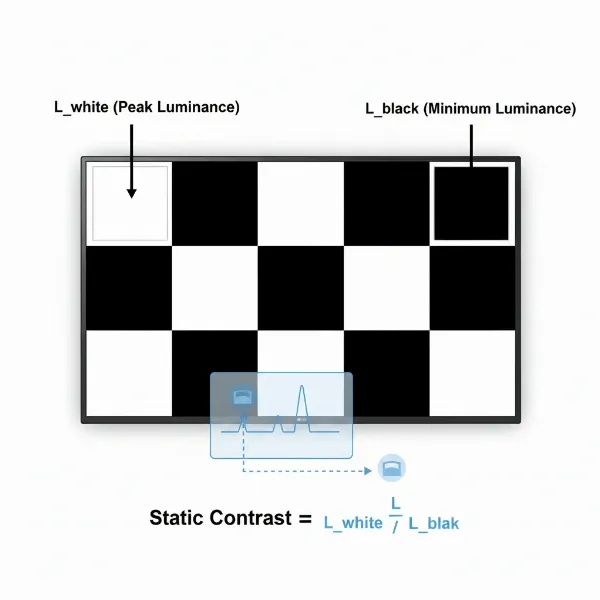 A graphic illustrating static contrast ratio with a checkerboard pattern and dynamic contrast ratio with two distinct scene images, one bright and one dark, emphasizing the difference.
Choosing a Computer Monitor: Focusing on Contrast
Making the right choice for your computer monitor requires aligning its contrast capabilities with your specific needs. Understanding static versus dynamic contrast empowers you to look beyond inflated marketing numbers and focus on what truly matters for your visual experience.
Identifying Your Viewing Needs
Before diving into specifications, consider how you primarily use your monitor:
- Professional Work (Graphic Design, Video Editing, Photography): For these tasks, precise color accuracy and consistent black levels are paramount. Prioritize monitors with high static contrast ratios, ideally IPS panels with excellent factory calibration, or OLED displays for the ultimate precision.
- Gaming: Gamers can benefit from both. While static contrast enhances immersion with deep blacks and vibrant colors, dynamic contrast can add ‘pop’ to cinematic games. However, be wary of dynamic features that introduce input lag or visual artifacts. VA panels are often a strong choice for gaming due to their high static contrast.
- General Use & Entertainment (Browsing, Movies, Casual Gaming): A monitor with at least a 1000:1 static contrast ratio is perfectly adequate. For a more engaging movie-watching experience, a VA panel or an OLED monitor would offer superior depth.
Prioritizing Static Contrast for Critical Work
For any task where color accuracy, fine detail, and consistent image presentation are crucial, static contrast ratio should be your primary consideration. A higher static contrast ensures that the entire screen displays a faithful representation of your content without the artificial adjustments that dynamic contrast introduces. This prevents unexpected shifts in brightness or color that could compromise your work. Look for reliable reviews that test actual static contrast rather than relying solely on manufacturer specifications.
Dynamic Contrast for Immersive Entertainment
While static contrast is foundational, dynamic contrast can play a supporting role in enhancing specific entertainment experiences. When watching movies with dramatic dark and light scenes, a well-implemented dynamic contrast feature can make the visuals more impactful. Similarly, for highly cinematic games, the deeper blacks and brighter highlights provided by dynamic contrast can contribute to a more immersive environment. However, ensure that the dynamic contrast implementation is smooth and doesn’t introduce noticeable flickering or detail loss.
Important Specifications to Check
When evaluating a computer monitor’s contrast capabilities, always:
- Look for the Static Contrast Ratio: This is the most honest indicator. A good static contrast ratio for an IPS panel is around 1000:1, while VA panels should be 2500:1 or higher. OLED panels offer infinite contrast.
- Research Panel Type: Knowing if it’s an IPS, VA, TN, OLED, or QLED panel will give you an immediate expectation of its contrast performance.
- Read Professional Reviews: Independent reviews often provide measured static contrast ratios and assess the effectiveness and potential drawbacks of dynamic contrast features.
- Consider Local Dimming Zones (for LED/LCD): More local dimming zones in an LED or Mini-LED display generally lead to better black levels and improved dynamic contrast.
Conclusion
The world of computer monitors is complex, but understanding the difference between static and dynamic contrast ratio is a powerful tool for making an informed purchasing decision. While dynamic contrast ratios often grab headlines with their astronomical figures, it’s the static contrast ratio that truly reflects a monitor’s native ability to deliver rich, detailed, and accurate images. For consistent, professional-grade performance, prioritize a high static contrast ratio. For immersive entertainment, dynamic contrast can complement a strong native contrast, but it should be viewed as an enhancement rather than a foundational metric. By focusing on these key distinctions, you can select a computer monitor that not only meets your needs but also elevates your entire visual experience.
What aspects of your Computer Monitor’s performance do you find most challenging to evaluate before making a purchase?
Frequently Asked Questions
What is a good static contrast ratio for a computer monitor?
For general use and productivity, a static contrast ratio of 1000:1 is considered good, commonly found in IPS panels. For deeper blacks and more vibrant images, especially for media consumption and gaming, VA panels offering 2500:1 or higher are excellent. OLED monitors provide infinite static contrast, setting the gold standard.
Does dynamic contrast ratio really improve picture quality?
Dynamic contrast ratio can improve the perceived picture quality in certain scenarios, like watching movies or playing games with significant dark and bright scenes, by making highlights brighter and shadows deeper. However, it relies on artificial backlight adjustments that can sometimes lead to flickering, loss of detail in dark areas, or inconsistent brightness, and its advertised values are often inflated and not standardized.
How does contrast ratio affect gaming and movie watching?
A high contrast ratio significantly enhances both gaming and movie watching by providing greater depth and realism to visuals. Deep blacks and bright whites make scenes more immersive, allowing for better visibility of details in shadows and highlights. This leads to more vibrant colors and a more engaging experience, whether you’re exploring a dark game world or watching a cinematic masterpiece.