The quest for the perfect computer monitor often involves navigating a maze of technical specifications, each promising an unparalleled visual experience. Among these, “response time” stands out, frequently highlighted with numbers like 1ms or 5ms Grey-to-Grey (GtG). But what do these figures truly mean for your daily use, your gaming sessions, or your professional workflow? Understanding the nuances between a 1ms and a 5ms GtG response time is crucial for making an informed decision, ensuring your monitor delivers the smooth, crisp visuals you expect without unnecessary investment. This article will demystify monitor response time, explain the Grey-to-Grey measurement, and break down the practical differences between 1ms and 5ms to help you choose wisely.
Understanding Computer Monitor Response Time
At its core, monitor response time is a measure of agility for each pixel on your screen. It dictates how quickly a pixel can change from one color to another, a fundamental aspect of how fluidly motion is displayed. Measured in milliseconds (ms), a lower number signifies a faster transition, which is generally desirable for dynamic content.
What is Response Time?
|
Our Picks for the Best Computer Monitor in 2026
As an Amazon Associate I earn from qualifying purchases.
|
||
| Num | Product | Action |
|---|---|---|
| 1 | Samsung 27\" Essential S3 (S36GD) Series FHD 1800R Curved Computer Monitor, 100Hz, Game Mode, Advanced Eye Comfort, HDMI and D-sub Ports, LS27D366GANXZA, 2024 |

|
| 2 | Samsung 32-Inch Flat Computer Monitor, 75Hz, Borderless Display, AMD FreeSync, Game Mode, Advanced Eye Care, HDMI and DisplayPort, LS32B304NWNXGO, 2024 |
|
| 3 | Philips 221V8LB 22 inch Class Thin Full HD (1920 x 1080) Monitor, 100Hz Refresh Rate, VESA, HDMI x1, VGA x1, LowBlue Mode, Adaptive Sync, 4 Year Advance Replacement Warranty |
|
| 4 | MNN Portable Monitor 15.6inch FHD 1080P USB C HDMI Gaming Ultra-Slim IPS Display w/Smart Cover & Speakers,HDR Plug&Play, External Monitor for Laptop PC Phone Mac (15.6\'\' 1080P) |
|
| 5 | Amazon Basics 24 Inch (23.8 inch viewable) Monitor, FHD 1080P, Max 100Hz, VESA Compatible, Built-in Speakers, Black |
|
| 6 | KOORUI 22 Inch Computer Monitor Full HD 1080P 100Hz PC Gaming Screen VA Panel Ultra-Slim Display 3000:1 Contrast Ratio with Adpitive Sync (HDMI/VGA/VESA Compatible 100x100mm/Audio Out), Tilt, Black |
|
| 7 | KOORUI 24-inch Computer Monitor Full HD 1920 x 1080p 100Hz VA Display 4000:1 Contrast Ratio with HDMI VGA, TÜV Rheinland Certified, 100 x 100 mm VESA Mountable, Ultra-Slim Design, Tilt, Black, E2412F |
|
| 8 | New! Sceptre 27-inch Gaming Monitor 100Hz 1ms DisplayPort HDMI x2 100% sRGB AMD FreeSync Build-in Speakers, Eye Care Frameless Machine Black 2025 (E275W-FW100T Series) |
|
| 9 | LG 24U411A-B 24-inch Full HD (1920 x 1080) IPS Computer Monitor, 120Hz, HDR10, Reader Mode, Flicker Safe, HDMI, Slim Stand Base, Black |
|
| 10 | acer 27 Inch Monitor- KB272-27 Inch FHD IPS (1920 x 1080) Display, Up to 120Hz Refresh Rate, 99% sRGB, Tilt, Adaptive-Sync Support (FreeSync Compatible) 1ms (VRB), HDMI & VGA Ports |
|
Response time refers to the duration it takes for a pixel to shift its state. In practical terms, this speed directly influences the clarity of moving images. If pixels are slow to change, they can leave behind trails or “ghosts” of previous frames, leading to a blurry visual experience, especially during fast-paced action. While various measurement methods exist, the Grey-to-Grey (GtG) standard has become the most prevalent in the industry.
The Significance of Grey-to-Grey (GtG)
Grey-to-Grey (GtG) measures the time it takes for a pixel to transition from one shade of grey to another. This is considered a more realistic metric than older methods that measured transitions from pure black to pure white, as real-world content rarely involves only extreme color shifts. While GtG provides a useful benchmark, it’s important to note that the specific “grey” shades used for measurement can vary between manufacturers, potentially leading to advertised 1ms figures that represent an optimal, rather than average, transition.
Why Response Time Matters
The primary reason response time holds significance is its impact on motion clarity. In scenarios where images on the screen change rapidly, such as competitive gaming, watching fast-action movies, or even scrolling through documents, a slow response time can introduce noticeable motion blur and ghosting. This creates a less immersive and potentially distracting viewing experience, where fast-moving objects appear smeared rather than sharply defined. For tasks demanding high visual fidelity and quick reactions, a faster response time becomes a critical factor.
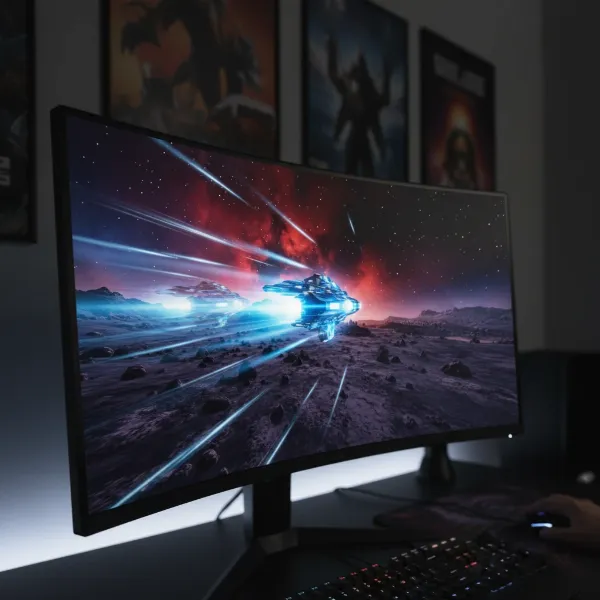 Illustration of motion blur and ghosting on a computer monitor due to slow response time
1ms vs. 5ms Grey-to-Grey: The Real Difference
When comparing 1ms and 5ms GtG response times, the numbers suggest a stark difference in pixel speed. On paper, a 1ms monitor can transition pixels five times faster than a 5ms monitor. However, the real-world impact of this difference is often more nuanced and depends heavily on the user’s activities and visual perception.
The Theoretical Gap
The theoretical distinction is straightforward: a 1ms GtG monitor completes a pixel transition in a single millisecond, while a 5ms GtG monitor takes five milliseconds. This speed advantage allows 1ms displays to update pixels more swiftly, reducing the time that “old” information lingers on the screen. For technologies that rely on rapid pixel changes, such as high refresh rate panels, this speed can be crucial in preventing visual artifacts.
Perceptible Differences for Gamers
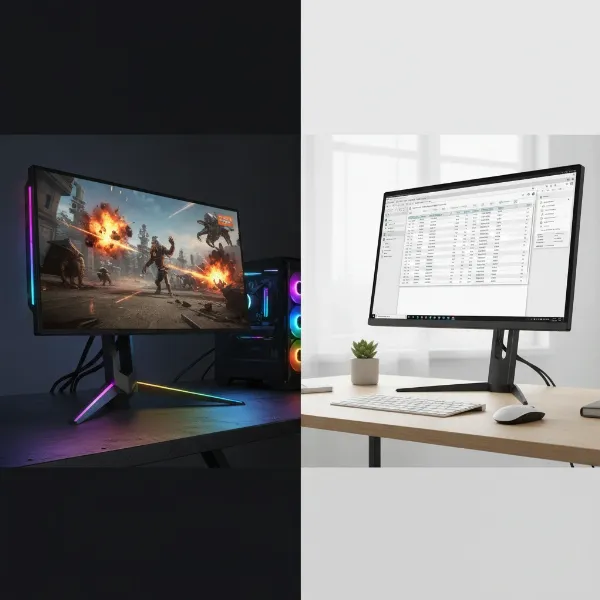
For competitive gamers, especially those immersed in fast-paced genres like first-person shooters (FPS) and esports titles, the difference between 1ms and 5ms GtG can be genuinely noticeable. A 1ms response time contributes to a cleaner, more fluid visual experience, minimizing the “smear” that might occur when enemies or objects zip across the screen. This can translate to more responsive aiming, better target tracking, and an overall competitive edge where every millisecond counts. In these high-stakes environments, professional players often prioritize the lowest possible response time.
Conversely, for casual gamers or those playing slower-paced genres, the difference might be negligible. A 5ms GtG monitor, especially when paired with a decent refresh rate, provides a perfectly enjoyable and smooth experience without significant visual drawbacks. The human eye and brain have their own processing limitations, and for many, the marginal improvement offered by 1ms over 5ms might not be perceivable outside of extremely demanding situations.
Beyond Gaming: General Use and Content Creation
Outside of the gaming arena, the distinction between 1ms and 5ms GtG becomes even less critical for the vast majority of users. For everyday tasks such as browsing the web, working with documents, or streaming video, a 5ms response time is more than adequate. These activities do not typically involve the kind of rapid, high-intensity motion that would expose the slight pixel lag of a 5ms display.
Even for content creation professionals, such as video editors or graphic designers, response time is often a secondary concern compared to factors like color accuracy, panel type (e.g., IPS for wide viewing angles and color fidelity), and resolution. While a faster response time never hurts, a 5ms GtG monitor will typically perform without issue for these applications, as the focus is less on instantaneous pixel changes and more on precise color reproduction and static image quality.
Factors Influencing Perceived Smoothness Beyond Response Time
While response time is a key player in visual fluidity, it’s not the sole determinant of a smooth display experience. Several other factors interact with response time to shape how you perceive motion on your computer monitor.
Refresh Rate
The refresh rate of a monitor, measured in Hertz (Hz), indicates how many times the screen updates its image per second. A 144Hz monitor, for example, can display 144 frames per second, vastly more than a standard 60Hz monitor. The relationship between response time and refresh rate is crucial: for a monitor to fully leverage a high refresh rate, its pixels must be able to change state fast enough to keep up. If the response time is slower than the time it takes for a new frame to be ready (e.g., a 5ms response time on a 144Hz monitor where each frame is displayed for approximately 6.9ms), you can still experience motion blur, even with a high refresh rate. Ideally, the response time should be equal to or less than the frame time (1000ms / Refresh Rate).
Input Lag
Often confused with response time, input lag refers to the total delay between performing an action (like clicking a mouse or pressing a key) and seeing that action reflected on the screen. This delay encompasses various stages, including processing by the operating system, the graphics card, and the monitor itself. While a fast response time contributes to a portion of the monitor’s input lag, it is not the entire picture. A monitor with excellent response time could still have high input lag due to internal processing, leading to a feeling of sluggishness despite crisp motion.
Overdrive Technology
Many modern monitors incorporate “overdrive” technology, designed to artificially accelerate pixel transitions. By applying a higher voltage to the liquid crystals for a brief period, overdrive forces the pixels to change state faster than they naturally would. This can effectively reduce GtG response times to advertised figures like 1ms or 0.5ms. However, aggressive overdrive settings can sometimes lead to an undesirable side effect known as “inverse ghosting” or “overshoot,” where pixels briefly transition past their target color before settling, creating a bright or dark halo around moving objects. Finding the optimal overdrive setting is a balance between speed and visual artifact prevention.
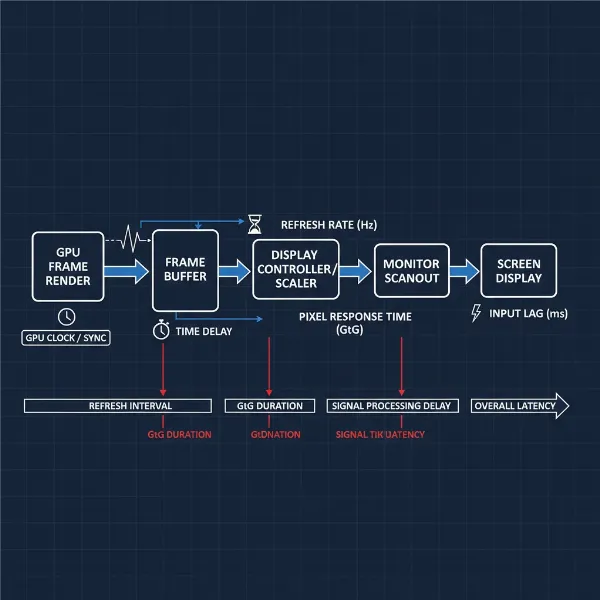 Diagram illustrating refresh rate, response time, and input lag in a computer monitor context
The “1ms Myth” and Marketing Realities
The ubiquitous “1ms GtG” marketing slogan often paints a picture of ultimate speed, but the reality can be more complex. Understanding the discrepancies between advertised specifications and real-world performance is key to a discerning purchase.
Manufacturer Reporting Standards
One significant factor contributing to the “1ms myth” is the variability in how manufacturers measure and report GtG response times. Many companies optimize their measurement for a specific, often best-case, grey-to-grey transition, rather than providing an average across all possible transitions. This allows them to achieve the coveted 1ms figure, even if other, more common transitions are considerably slower. The ambiguity of “Grey-to-Grey” itself—what shades of grey are being measured?—further complicates direct comparisons between brands.
> “While 1ms GtG is a fantastic marketing figure, savvy consumers should always look beyond the headline number and seek out independent reviews that measure a monitor’s average response time across a spectrum of transitions.” – Dr. Elena V. Petrov, Display Technology Analyst
Real-World Performance vs. Advertised Specs
Due to these reporting practices, a monitor advertised as 1ms GtG might, in real-world testing, exhibit an average response time closer to 3-5ms. This doesn’t mean the advertised figure is entirely false, but rather that it represents a peak performance under specific, ideal conditions. Independent reviews and professional testing are invaluable resources for understanding a monitor’s true performance. These tests often measure a wider range of GtG transitions and can identify issues like inverse ghosting that might arise from aggressive overdrive settings used to achieve low response times. Relying solely on advertised numbers can lead to unmet expectations, especially for discerning users.
Choosing the Right Computer Monitor Response Time for Your Needs
Selecting the ideal response time for your computer monitor boils down to understanding your primary use case and balancing it with other critical specifications and your budget. There’s no one-size-fits-all answer, but rather an optimal choice for different needs.
For Competitive Gamers
If your passion lies in competitive gaming, particularly fast-paced esports titles where every fraction of a second can determine victory or defeat, prioritizing a 1ms GtG response time is highly recommended. Paired with a high refresh rate (144Hz or more) and low input lag, a 1ms monitor will provide the crispest motion, minimize blur, and ensure the most responsive visual feedback, giving you a tangible edge. Look for monitors featuring fast TN, IPS, or OLED panels that genuinely deliver on their low response time claims.
For Casual Gamers and Multimedia Enthusiasts
For casual gamers who enjoy a variety of genres, or multimedia enthusiasts who consume a lot of video content, a 5ms GtG response time is often perfectly sufficient. These users will likely appreciate a good balance of features, such as vibrant colors, wide viewing angles (common in IPS panels), and decent resolution, over the absolute fastest pixel transitions. While a 1ms monitor would still perform well, the additional cost might not translate into a noticeable improvement for their specific needs.
For Professional and Office Use
For professional applications like graphic design, video editing, or general office work, response time is typically not a primary concern. Instead, focus on factors such as color accuracy (especially for creative work), resolution, screen size, panel type (e.g., IPS for color consistency and viewing angles), and ergonomic adjustability. A 5ms or even 8ms GtG response time will not impede productivity or visual quality for these static or moderately dynamic tasks. Investing in features that enhance color fidelity and workspace comfort will yield far greater benefits.
Comparison Table: 1ms vs. 5ms GtG
| Feature/Scenario | 1ms GtG Monitor | 5ms GtG Monitor |
|---|---|---|
| Pixel Transition Speed | Extremely Fast | Fast |
| Motion Blur/Ghosting | Minimal to Imperceptible | Potentially visible in very fast scenes |
| Competitive Gaming | Highly Recommended for optimal performance | Generally sufficient for casual gaming, may show slight blur in intense scenes |
| Casual Gaming/Multimedia | Excellent (but often provides diminishing returns) | Very Good, offers a great balance of performance and cost |
| Professional/Office Use | Not a primary concern; other factors more important | Not a primary concern; other factors more important |
| Price Point | Often higher due to specialized panel tech and features | Generally more affordable, wider range of options |
| Typical Panel Types | Fast TN, rapid IPS, high-performance OLED | IPS, VA, standard TN, wider variety of budget options |
 Side-by-side comparison of a gaming monitor and an office monitor, highlighting their differences in design and assumed features
Conclusion
Understanding Computer Monitor response time, particularly the Grey-to-Grey (GtG) measurement, is essential for making an informed purchasing decision. While a 1ms GtG response time offers the fastest pixel transitions and can provide a tangible advantage for competitive gamers seeking to eliminate motion blur and ghosting, a 5ms GtG monitor remains a highly capable and often more cost-effective choice for casual gamers, multimedia users, and professionals. The “1ms myth” reminds us to look beyond marketing claims and consider real-world performance. Ultimately, the best response time for you depends on your specific needs, your budget, and the balance you strike with other crucial monitor specifications like refresh rate and panel type. Don’t let a single number dictate your choice; instead, consider how the monitor will integrate into your daily digital life. What aspects of monitor performance do you prioritize most?
Frequently Asked Questions
Is 1ms response time necessary for gaming?
For hardcore competitive gamers, especially in fast-paced FPS or esports titles, a 1ms response time can provide a noticeable edge by minimizing motion blur and ghosting. However, for casual gamers or those playing slower genres, a 5ms response time is usually more than sufficient and often imperceptible in difference.
Does 5ms response time cause ghosting?
In very fast-moving scenes or high refresh rate environments, a 5ms response time can potentially cause some minor ghosting or motion blur compared to a 1ms display. However, for most users and general content, any ghosting would be minimal and often unnoticeable.
What is the difference between response time and input lag?
Response time refers specifically to how quickly pixels change colors, affecting motion blur. Input lag, conversely, is the total delay from an action (e.g., mouse click) to its display on screen, encompassing system, GPU, and monitor processing. While response time contributes to input lag, they are distinct measurements.
Can I notice the difference between 1ms and 5ms?
Whether you can notice the difference between 1ms and 5ms GtG largely depends on your sensitivity, the content you’re viewing, and the monitor’s refresh rate. Competitive gamers in fast-paced scenarios are most likely to perceive the difference, while for general use or casual gaming, it’s often negligible.
Is a higher refresh rate more important than lower response time?
Both are crucial for a smooth visual experience. A high refresh rate ensures more frames are displayed per second, while a low response time ensures those frames are rendered clearly without blur. For optimal performance, especially in gaming, it’s best to have both a high refresh rate and a low response time that can keep up with it.