Relocating your gaming rig or moving your home office presents a unique challenge, especially when it comes to delicate electronics. Among these, the curved monitor stands out, not just for its immersive visual experience but also for its distinctive shape, which demands extra care during transport. Unlike their flat counterparts, curved screens possess a specific vulnerability that, if overlooked, can lead to costly damage or a shattered display. Ensuring your prized curved monitor arrives at its new destination in pristine condition requires meticulous planning and execution. This comprehensive guide will walk you through every essential step, from gathering the right materials to expertly packing and transporting your curved display, safeguarding your investment and providing peace of mind.
Why Curved Monitors Require Special Care
Curved monitors are engineered to wrap around your field of vision, offering an enhanced, immersive viewing experience. However, this very design makes them inherently more susceptible to damage during transit compared to traditional flat screens. The pronounced curvature, particularly on larger ultrawide models, introduces stress points at the corners and along the edges that are especially vulnerable to impact and vibration. These areas can easily chip, crack, or suffer internal damage if not properly protected. Moreover, the expansive surface area of many curved monitors means there’s more screen real estate exposed to potential hazards like scratches or pressure points. Their bulkier nature can also make them more challenging to handle and secure, increasing the risk of accidental drops or shifts during movement. Therefore, understanding these specific vulnerabilities is the first step toward devising an effective protection strategy.
Essential Packing Materials
Successfully transporting a curved monitor hinges on having the right packing materials. While the original box and its custom-fitted foam inserts offer the best possible protection, these are often discarded after purchase. If you no longer have the original packaging, don’t fret; suitable alternatives and protective layers can be assembled to create a secure environment for your monitor.
If you have the original box: This is always your best option. The manufacturer’s packaging is specifically designed to cradle your monitor’s unique curvature and absorb shocks.
If you don’t have the original box, gather these materials:
- Sturdy Cardboard Box: Opt for a double-walled box that is slightly larger than your monitor – ideally 2-4 inches wider and taller. This extra space is crucial for accommodating adequate padding. Consider specialized TV moving boxes or even large wardrobe boxes from moving companies, which can be adapted.
- Soft Cloth or Microfiber Towel: For direct screen protection, preventing scratches.
- High-Density Foam Sheets: To provide a cushioned layer directly over the screen and potentially wrap around the monitor’s body.
- Large Bubble Wrap: Essential for multiple layers of cushioning around the entire monitor, paying extra attention to the curved edges and corners.
- Foam Corner Protectors or Profiles: These are critical for reinforcing the vulnerable corners and edges of your curved display, preventing chips and microcracks. Pool noodles or water pipe insulators can also be adapted for this purpose.
- Packing Peanuts or Crumpled Paper: For filling any void spaces within the box, ensuring the monitor cannot shift during transit.
- Packing Tape: Strong, reliable tape for sealing the box securely.
- Scissors or Utility Knife: For cutting materials to size.
- Marker: To label the box clearly.
> “The unique curvature of these displays, while providing an unparalleled viewing experience, also makes them inherently more susceptible to damage from impact and pressure during transit. Proper padding and securing are non-negotiable for curved monitors.” – Alex Chen, Lead IT Technician
Step-by-Step Guide to Packing Your Curved Monitor
Packing a curved monitor safely is a methodical process. Following these steps will significantly reduce the risk of damage, whether you’re moving it across town or shipping it across the country.
Preparation: Disconnect and Disassemble
|
Our Picks for the Best Computer Monitor in 2026
As an Amazon Associate I earn from qualifying purchases.
|
||
| Num | Product | Action |
|---|---|---|
| 1 | Samsung 32-Inch Flat Computer Monitor, 75Hz, Borderless Display, AMD FreeSync, Game Mode, Advanced Eye Care, HDMI and DisplayPort, LS32B304NWNXGO, 2024 |

|
| 2 | KOORUI 24-inch Computer Monitor Full HD 1920 x 1080p 100Hz VA Display 4000:1 Contrast Ratio with HDMI VGA, TÜV Rheinland Certified, 100 x 100 mm VESA Mountable, Ultra-Slim Design, Tilt, Black, E2412F |
|
| 3 | MNN Portable Monitor 15.6inch FHD 1080P USB C HDMI Gaming Ultra-Slim IPS Display w/Smart Cover & Speakers,HDR Plug&Play, External Monitor for Laptop PC Phone Mac (15.6\'\' 1080P) |
|
| 4 | Philips 221V8LB 22 inch Class Thin Full HD (1920 x 1080) Monitor, 100Hz Refresh Rate, VESA, HDMI x1, VGA x1, LowBlue Mode, Adaptive Sync, 4 Year Advance Replacement Warranty |
|
| 5 | LG 24U411A-B 24-inch Full HD (1920 x 1080) IPS Computer Monitor, 120Hz, HDR10, Reader Mode, Flicker Safe, HDMI, Slim Stand Base, Black |
|
| 6 | acer 27 Inch Monitor- KB272-27 Inch FHD IPS (1920 x 1080) Display, Up to 120Hz Refresh Rate, 99% sRGB, Tilt, Adaptive-Sync Support (FreeSync Compatible) 1ms (VRB), HDMI & VGA Ports |
|
| 7 | Samsung 27\" Essential S3 (S36GD) Series FHD 1800R Curved Computer Monitor, 100Hz, Game Mode, Advanced Eye Comfort, HDMI and D-sub Ports, LS27D366GANXZA, 2024 |
|
| 8 | New! Sceptre 27-inch Gaming Monitor 100Hz 1ms DisplayPort HDMI x2 100% sRGB AMD FreeSync Build-in Speakers, Eye Care Frameless Machine Black 2025 (E275W-FW100T Series) |
|
| 9 | Amazon Basics 24 Inch (23.8 inch viewable) Monitor, FHD 1080P, Max 100Hz, VESA Compatible, Built-in Speakers, Black |
|
| 10 | KOORUI 22 Inch Computer Monitor Full HD 1080P 100Hz PC Gaming Screen VA Panel Ultra-Slim Display 3000:1 Contrast Ratio with Adpitive Sync (HDMI/VGA/VESA Compatible 100x100mm/Audio Out), Tilt, Black |
|
Before you begin packing, ensure your monitor is completely powered off and unplugged from all power sources and devices. Gently coil and secure all cables (power, HDMI, DisplayPort, USB) with cable ties or Velcro straps and pack them in a separate bag or a designated section of the monitor box. If your monitor’s stand is detachable, carefully remove it according to the manufacturer’s instructions. Packing the stand separately not only makes the monitor lighter and easier to handle but also prevents it from potentially damaging the screen during movement. Finally, give your screen a gentle wipe with a microfiber cloth to remove dust and fingerprints, ensuring a clean surface for protective layers.
Screen Protection: The Critical First Layer
The monitor screen is the most vulnerable component, especially on a curved display. Start by placing a thin, soft layer of high-density foam or a clean microfiber cloth directly over the entire screen surface. This acts as a barrier against scratches. Next, generously wrap the entire monitor in multiple layers of quality bubble wrap. Aim for at least two to three layers, ensuring every corner, edge, and the curved face is thoroughly covered. Secure the bubble wrap with packing tape, being careful not to let the tape directly touch the screen. For added reinforcement, apply foam corner protectors or custom-cut foam profiles to the edges of the monitor. This is particularly important for curved screens, as these areas are prone to pressure and impact damage.
Box Selection & Padding: Securing the Display
If you have the original box, use it with its custom foam inserts, ensuring a snug fit. If not, line the bottom of your chosen double-walled box with at least two inches of cushioning material, such as dense foam, crumpled packing paper, or packing peanuts.
Carefully place the wrapped monitor into the box in an upright position, mimicking how it sits on your desk. This orientation helps reduce stress on the screen during transport. Avoid placing the monitor horizontally, as this increases the risk of deformation and cracks, especially if other items are placed on top.
Once the monitor is in place, fill all remaining empty spaces around the sides and top with additional padding materials. The goal is to prevent any movement of the monitor inside the box. For shipping, consider the “double-boxing” technique: place the padded monitor in one box, then place that box inside a larger, second box, filling the gap between the two with more packing peanuts or bubble wrap. This creates an extra protective barrier against external impacts.
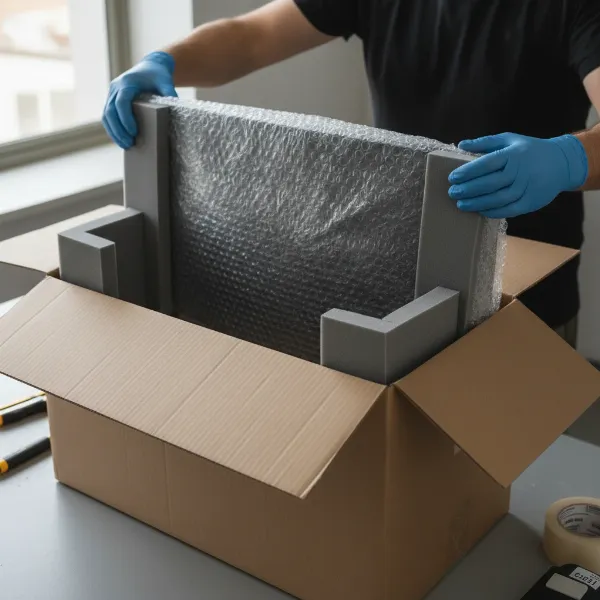 Person carefully packing a curved monitor into a box with bubble wrap and foam, focusing on the curved screen.
Sealing and Labeling: Final Touches
Once your monitor is securely nestled amidst the padding, close the box flaps and seal all seams with strong packing tape. Apply at least two layers of tape, particularly along the central seam and all edges, to ensure the box remains intact. Finally, use a marker to clearly label the box on multiple sides with “FRAGILE,” “HANDLE WITH CARE,” and “THIS SIDE UP” arrows. These labels communicate crucial handling instructions to anyone who interacts with the package, prompting them to exercise extra caution.
Comparison Table: Packing Materials Quick Glance
| Material | Purpose | Best Use Case | Notes |
|---|---|---|---|
| Original Box & Foam | Optimal, custom-fit protection | Ideal solution, if available | Designed for specific monitor model, best shock absorption |
| Double-walled Cardboard Box | Primary outer casing | If original box unavailable | Sturdy, allows for ample internal padding |
| Soft Cloth/Foam Sheet | Direct screen surface protection | First layer on screen | Prevents scratches and abrasions |
| Large Bubble Wrap | Primary cushioning and impact absorption | Wrapping entire monitor | Multiple layers essential for curved surfaces and edges |
| Packing Peanuts/Crumpled Paper | Void fill, secondary cushioning | Filling empty space in box | Prevents shifting, adds shock absorption |
| Foam Corner Protectors | Edge and corner reinforcement | Critical for curved edges | Prevents stress cracks and chips, adapts to curvature |
| Packing Tape | Securing components and sealing box | All packing stages, box sealing | Strong adhesion, multiple layers for box integrity |
Transporting Your Monitor: Tips for a Smooth Journey
Even the most meticulously packed monitor can be damaged if not transported correctly. The method of transport dictates specific precautions.
By Car
When moving your curved monitor in your personal vehicle, placement and securing are paramount. Ideally, place the boxed monitor on the back seat, oriented upright, with the screen facing the seatback. Use seatbelts to firmly strap the box in place, often by criss-crossing them, to prevent any movement during acceleration, braking, or turns. Surround the boxed monitor with soft items like blankets, pillows, or duvets to cushion it further and prevent it from knocking against hard surfaces. Never place anything heavy on top of the box.
By Moving Truck
If using a moving truck, position your monitor box strategically. Place it towards the front of the truck, ideally nearest the cab, where vibrations and impacts are generally less severe. Surround it with other sturdy, stable items that will prevent it from shifting, but do not stack heavy items on top of it or compress it between other objects. Again, maintain an upright orientation. Communicate clearly with professional movers about the fragility and specific handling requirements of your curved monitor.
Shipping Services
For longer distances, you might opt for a shipping service. This is where double-boxing becomes invaluable, providing an extra layer of defense against the rigors of commercial shipping. When selecting a carrier, consider their reputation for handling fragile items and inquire about insurance options. Many carriers, like UPS or FedEx, offer professional packing services and associated insurance, which can be a worthwhile investment for high-value curved monitors. Additionally, be mindful of environmental factors; extreme temperature fluctuations or high humidity can harm internal electronics. If possible, avoid shipping during peak times or extreme weather conditions.
Common Mistakes to Avoid
Protecting your curved monitor is about attention to detail. Steering clear of these common errors can make all the difference:
- Not Using Enough Padding: Insufficient cushioning leaves your monitor vulnerable to impacts and vibrations. Every empty space inside the box should be filled.
- Placing the Monitor Horizontally: Laying a monitor flat, especially a large curved one, can put undue stress on the screen and internal components, increasing the risk of damage.
- Using Flimsy Boxes: A weak or worn box offers minimal protection and can collapse under pressure. Always opt for sturdy, double-walled cardboard.
- Ignoring Labels: Failing to mark the box as “FRAGILE” and “THIS SIDE UP” means handlers may not treat it with the necessary care.
- Neglecting Screen Surface Protection: Directly wrapping the screen with bubble wrap without a soft intermediary layer can cause scratches. Always use a soft cloth or foam sheet first.
- Not Securing the Monitor in Transport: Allowing the monitor box to slide or shift freely in a vehicle is an invitation for disaster.
Conclusion
Transporting a curved monitor safely is an endeavor that demands careful planning and execution, but the effort is a small price to pay for protecting your valuable display. By understanding the unique vulnerabilities of curved screens, gathering the right packing materials, and meticulously following each step of the preparation and packing process, you can significantly mitigate the risks of damage. Whether you’re moving it yourself or entrusting it to a shipping service, prioritizing screen protection, securing the monitor upright, and ensuring ample cushioning will ensure your curved monitor arrives at its new home in flawless condition. Don’t underestimate the importance of these precautions; your immersive viewing experience depends on it.
What extra steps do you take to safeguard your most valuable electronics during a move?
Frequently Asked Questions
Are curved monitors more fragile than flat ones during transport?
Yes, generally, curved monitors are considered more fragile than flat ones for transport. Their unique shape makes the corners and edges particularly susceptible to impact and vibration damage, increasing the risk of chips or cracks compared to flat panels. They also tend to be bulkier, posing additional handling challenges.
Can I transport a curved monitor without its original box?
Absolutely, you can transport a curved monitor without its original box, though it requires more effort to replicate the protective qualities. You’ll need a sturdy, double-walled cardboard box that’s slightly larger than your monitor, along with ample bubble wrap, foam sheets, and corner protectors to ensure sufficient padding and prevent movement.
How do I protect the curve specifically when packing?
To protect the curve specifically, start with a soft cloth or foam sheet directly on the screen, then wrap the entire monitor in multiple layers of quality bubble wrap, paying extra attention to the curved edges. Additionally, use foam corner protectors or custom-cut foam profiles along the curved perimeter to absorb shocks and prevent stress on the display.
What’s the best orientation for moving a curved monitor?
The best orientation for moving a curved monitor is upright, as it typically sits on a desk. This vertical positioning helps distribute weight evenly and reduces the load on the screen during movement and vibrations. Avoid placing it horizontally, as this increases the risk of screen deformation and cracks, especially if other items are stacked on top.