Stepping into the fiercely competitive world of high-performance gaming displays, the Sony Inzone M9 computer monitor arrives with high expectations, particularly for PlayStation 5 enthusiasts. For years, Sony has dominated the console landscape, and now they aim to extend that prowess to the desktop. This review delves into the Inzone M9, examining its core specifications, design, gaming capabilities, and overall value to help you determine if this 4K monitor lives up to the hype and is the right fit for your gaming setup.
Sony Inzone M9: Key Specifications at a Glance
The Sony Inzone M9 boasts an impressive spec sheet designed to attract serious gamers. At its heart is a 27-inch IPS panel, delivering a crisp 4K UHD resolution of 3840 x 2160 pixels. This combination ensures stunning visual fidelity, making every detail pop whether you’re exploring vast open worlds or engaging in fast-paced competitive matches.
The monitor features a 144Hz refresh rate, providing fluid motion that is crucial for a smooth gaming experience. Coupled with a rapid 1ms (GtG) response time, it minimizes ghosting and motion blur, ensuring actions on screen are virtually instantaneous. For adaptive synchronization, the Inzone M9 supports NVIDIA G-Sync Compatibility and HDMI 2.1 Variable Refresh Rate (VRR), effectively eliminating screen tearing and stuttering across various frame rates.
A standout feature is its DisplayHDR 600 certification, backed by a Full-Array Local Dimming (FALD) backlight with 96 zones. This technology aims to deliver improved contrast and brighter highlights, with a peak brightness of 600 nits. The monitor also offers a wide color gamut, covering 95% of the DCI-P3 space, alongside 10-bit color depth, which results in vibrant and accurate color reproduction.
Design and Ergonomics: A PlayStation Aesthetic
The Inzone M9’s design unmistakably draws inspiration from the PlayStation 5, featuring a bold, angular white and black aesthetic. This makes it an ideal aesthetic companion for PS5 owners looking to complete their console setup with a matching monitor. The overall build quality feels solid, contributing to a premium look.
However, the ergonomic flexibility of the stand is an area where the Inzone M9 faces criticism. While it allows for height adjustment, it often lacks the full range of motion seen in competing monitors, with tilt being its primary adjustment. This limited adjustability can make finding the perfect viewing position challenging for some users, impacting long-term comfort during extended gaming sessions. Despite its distinctive look, the practical utility of the stand might not meet everyone’s expectations for a monitor in this price bracket.
Gaming Performance: Smooth Visually, Mixed HDR
When it comes to raw gaming performance, the Sony Inzone M9 generally delivers a satisfying experience. The combination of a 144Hz refresh rate and 1ms GtG response time ensures incredibly smooth and responsive gameplay. Input lag is remarkably low, providing that critical competitive edge where every millisecond counts. This makes it a strong contender for many PC gamers, though ultra-competitive players might still prefer monitors with even higher refresh rates (240Hz+).
For console gamers, especially those with a PlayStation 5 or Xbox Series X, the Inzone M9 shines. Equipped with HDMI 2.1 ports, it fully supports 4K resolution at 120Hz, unlocking the maximum potential of current-generation consoles. Sony’s “Perfect for PS5” features, such as Auto HDR Tone Mapping, automatically optimize HDR settings for your console, and Auto Genre Picture Mode switches between game and movie modes based on content. This integration provides a seamless, plug-and-play experience, giving PS5 users a distinct advantage.
While SDR gaming is excellent, the HDR performance presents a more nuanced picture. The DisplayHDR 600 certification and FALD system aim for impactful HDR, delivering bright highlights and vivid colors. However, with only 96 local dimming zones, some users report issues with blooming around bright objects on dark backgrounds and less-than-perfect black uniformity. While it certainly enhances the HDR experience over monitors without local dimming, it doesn’t quite reach the stellar contrast and inky blacks offered by mini-LED or OLED alternatives.
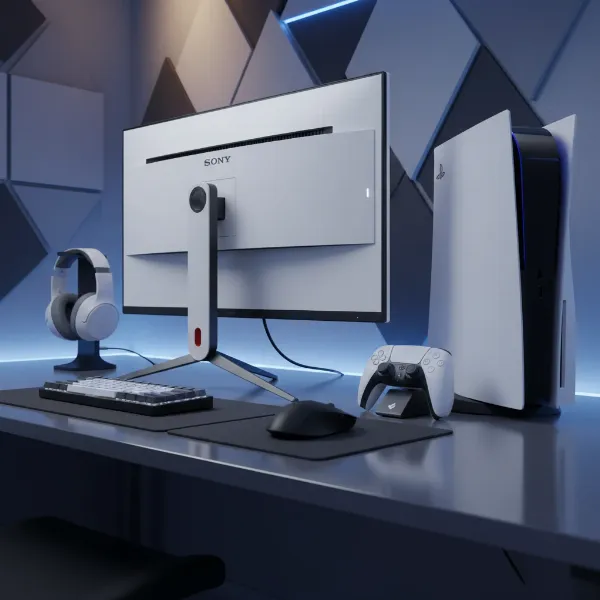 A detailed shot of the Sony Inzone M9 computer monitor integrated into a modern gaming setup with a PS5 console and peripherals.
Display Quality: Vibrant Colors, FALD Nuances
Beyond gaming, the Sony Inzone M9 holds its own in general display quality. The IPS panel ensures wide 178-degree viewing angles, maintaining color consistency even when viewed from the side. This is beneficial for collaborative work or when multiple people are viewing the screen. The monitor’s 10-bit color depth and 95% DCI-P3 color gamut coverage mean it can render a vast array of vibrant and accurate colors, making it suitable for casual content creation and media consumption.
The 400 nits of sustained brightness ensures good visibility in well-lit rooms. However, its static contrast ratio of 1000:1 is typical for an IPS panel and, without effective local dimming, can result in less profound blacks compared to VA panels or OLEDs. The Full-Array Local Dimming is designed to compensate for this, boosting contrast for HDR content, but its limited zone count can lead to the aforementioned blooming artifacts in challenging scenes. Furthermore, some users note that SDR content can appear oversaturated due to the lack of an sRGB emulation mode, which might require calibration for color-sensitive work.
Connectivity and Additional Features
The Sony Inzone M9 is well-equipped with connectivity options, ensuring broad compatibility with various devices. It features two HDMI 2.1 ports, crucial for unlocking 4K 120Hz gaming on current-gen consoles and powerful PCs. Additionally, there is one DisplayPort 1.4, a USB-C port with DisplayPort Alt Mode (which also functions as an upstream connection), and a USB-B upstream port. The integrated USB hub includes three USB-A downstream ports, allowing for easy connection of peripherals.
A convenient KVM (Keyboard, Video, Mouse) switch is also integrated, enabling users to control two connected computers with a single set of keyboard and mouse. This feature is particularly useful for those who switch between a work laptop and a gaming PC. While the monitor includes dual 2W integrated speakers, their audio quality is generally considered rudimentary and not suitable for an immersive gaming or media experience, making external speakers or a headset a necessary addition.
Bảng so sánh các loại Computer Monitor
| Feature | Sony Inzone M9 (FALD IPS) | LG 27GP950-B (IPS) | Cooler Master Tempest GP27U (Mini-LED IPS) |
|---|---|---|---|
| Display Size | 27-inch | 27-inch | 27-inch |
| Resolution | 4K UHD (3840 x 2160) | 4K UHD (3840 x 2160) | 4K UHD (3840 x 2160) |
| Refresh Rate | 144Hz | 144Hz (Overclockable to 160Hz) | 160Hz |
| Response Time | 1ms GtG | 1ms GtG | 1ms GtG |
| HDR Standard | DisplayHDR 600 | DisplayHDR 600 | DisplayHDR 1000 |
| Backlight Tech | Full-Array Local Dimming (96 zones) | Edge-Lit (Limited Zones) | Mini-LED (576 zones) |
| Peak Brightness | 600 nits | 600 nits | 1000+ nits |
| Color Gamut | 95% DCI-P3 | 98% DCI-P3 | 98% DCI-P3 |
| Connectivity | 2x HDMI 2.1, 1x DP 1.4, USB-C, USB-B Hub | 2x HDMI 2.1, 1x DP 1.4, USB Hub | 2x HDMI 2.1, 1x DP 1.4, USB-C, USB Hub |
| VRR Support | G-Sync Compatible, HDMI 2.1 VRR, Adaptive-Sync | G-Sync Compatible, FreeSync Premium Pro | G-Sync Compatible, FreeSync Premium Pro |
| Ergonomics | Limited (Height, Tilt) | Good (Height, Tilt, Swivel, Pivot) | Good (Height, Tilt, Swivel, Pivot) |
| Key Advantage | PS5 Integration, Design Consistency | Excellent overall performance, Ergonomics, Color Accuracy | Superior HDR (Mini-LED), More Local Dimming Zones, Higher Contrast |
Is the Sony Inzone M9 the Right Monitor for You?
Choosing the ideal computer monitor involves balancing features, performance, and budget with your specific needs. The Sony Inzone M9 is particularly compelling for a distinct audience. If you are a PlayStation 5 owner looking for a monitor that perfectly complements your console in terms of design and offers seamless integration with features like Auto HDR Tone Mapping and Auto Genre Picture Mode, the Inzone M9 is a top-tier choice. Its 4K 120Hz support via HDMI 2.1 makes it an excellent console gaming companion.
For PC gamers, the Inzone M9 offers a very strong package with its 4K resolution, 144Hz refresh rate, and 1ms response time, ensuring smooth and visually rich gameplay. However, its Full-Array Local Dimming, while good, doesn’t quite match the HDR impact of monitors utilizing mini-LED technology with significantly more dimming zones. If class-leading HDR performance and superior black levels are your absolute priority, especially for PC gaming, you might find more compelling alternatives at a similar or slightly higher price point.
Consider your budget carefully. The Inzone M9 often sits at a premium price. If its unique PS5 integration and design appeal strongly to you, and you’re satisfied with its HDR capabilities, it could be a worthwhile investment. However, if you prioritize raw HDR performance, color accuracy out of the box (some alternatives are more accurate), or extensive ergonomic adjustments, it’s advisable to explore other options mentioned in the comparison. Ultimately, the Inzone M9 offers a balanced, high-performance experience, but its unique value proposition is strongest for Sony console enthusiasts.
Conclusion
The Sony Inzone M9 is a significant entry into the high-end gaming monitor market, delivering a robust 4K 144Hz IPS experience tailored for both PC and console gamers. Its standout features include excellent core display performance, vibrant color reproduction, low input lag, and deep integration with the PlayStation 5, making it an ideal companion for next-gen console enthusiasts.
However, its Full-Array Local Dimming, while present, doesn’t always provide the stellar HDR contrast that some competitors achieve with more advanced backlight technologies. The ergonomic limitations of its stand and the basic integrated speakers are also points to consider. Despite these minor drawbacks, the Inzone M9 offers a compelling blend of features and performance. For those who prioritize a seamless PS5 experience and a stylish, high-resolution computer monitor, the Inzone M9 stands as a strong contender, provided its price aligns with your expectations. Have you considered how the Inzone M9 might elevate your gaming setup?
Frequently Asked Questions
How does the Sony Inzone M9’s HDR performance compare to OLED monitors?
|
Our Picks for the Best Computer Monitor in 2026
As an Amazon Associate I earn from qualifying purchases.
|
||
| Num | Product | Action |
|---|---|---|
| 1 | KOORUI 22 Inch Computer Monitor Full HD 1080P 100Hz PC Gaming Screen VA Panel Ultra-Slim Display 3000:1 Contrast Ratio with Adpitive Sync (HDMI/VGA/VESA Compatible 100x100mm/Audio Out), Tilt, Black |

|
| 2 | Amazon Basics 24 Inch (23.8 inch viewable) Monitor, FHD 1080P, Max 100Hz, VESA Compatible, Built-in Speakers, Black |
|
| 3 | Samsung 32-Inch Flat Computer Monitor, 75Hz, Borderless Display, AMD FreeSync, Game Mode, Advanced Eye Care, HDMI and DisplayPort, LS32B304NWNXGO, 2024 |
|
| 4 | Philips 221V8LB 22 inch Class Thin Full HD (1920 x 1080) Monitor, 100Hz Refresh Rate, VESA, HDMI x1, VGA x1, LowBlue Mode, Adaptive Sync, 4 Year Advance Replacement Warranty |
|
| 5 | acer 27 Inch Monitor- KB272-27 Inch FHD IPS (1920 x 1080) Display, Up to 120Hz Refresh Rate, 99% sRGB, Tilt, Adaptive-Sync Support (FreeSync Compatible) 1ms (VRB), HDMI & VGA Ports |
|
| 6 | Samsung 27\" Essential S3 (S36GD) Series FHD 1800R Curved Computer Monitor, 100Hz, Game Mode, Advanced Eye Comfort, HDMI and D-sub Ports, LS27D366GANXZA, 2024 |
|
| 7 | LG 24U411A-B 24-inch Full HD (1920 x 1080) IPS Computer Monitor, 120Hz, HDR10, Reader Mode, Flicker Safe, HDMI, Slim Stand Base, Black |
|
| 8 | MNN Portable Monitor 15.6inch FHD 1080P USB C HDMI Gaming Ultra-Slim IPS Display w/Smart Cover & Speakers,HDR Plug&Play, External Monitor for Laptop PC Phone Mac (15.6\'\' 1080P) |
|
| 9 | New! Sceptre 27-inch Gaming Monitor 100Hz 1ms DisplayPort HDMI x2 100% sRGB AMD FreeSync Build-in Speakers, Eye Care Frameless Machine Black 2025 (E275W-FW100T Series) |
|
| 10 | KOORUI 24-inch Computer Monitor Full HD 1920 x 1080p 100Hz VA Display 4000:1 Contrast Ratio with HDMI VGA, TÜV Rheinland Certified, 100 x 100 mm VESA Mountable, Ultra-Slim Design, Tilt, Black, E2412F |
|
While the Sony Inzone M9 features DisplayHDR 600 with Full-Array Local Dimming, providing enhanced contrast over standard IPS panels, it does not achieve the perfect blacks and infinite contrast ratios offered by OLED monitors. OLED technology provides per-pixel dimming, leading to superior HDR performance, deeper blacks, and no blooming artifacts, which can sometimes be visible on the Inzone M9 due to its limited number of dimming zones.
Is the Sony Inzone M9 a good choice for competitive PC gaming?
The Sony Inzone M9 is a very capable monitor for most PC gamers, offering a 4K resolution, 144Hz refresh rate, and 1ms response time. These specifications are excellent for immersive and responsive gaming. However, for highly competitive esports players who prioritize the absolute highest frame rates, monitors with refresh rates of 240Hz or higher might offer a marginal advantage, though often at a lower resolution or a significantly higher price.
What are the “Perfect for PS5” features of the Sony Inzone M9?
The “Perfect for PS5” features include Auto HDR Tone Mapping, which automatically optimizes HDR settings on the monitor when connected to a PS5, and Auto Genre Picture Mode, which detects the content (gaming or movie) and adjusts the monitor’s settings accordingly. These features aim to provide a plug-and-play optimized experience specifically for PlayStation 5 users, enhancing visual quality and reducing manual adjustments.