Choosing a new computer monitor can be a significant investment, and one often overlooked detail holds immense power over your daily visual experience: the screen finish. Have you ever noticed how some screens seem to reflect every light source in your room, while others absorb light, offering a softer, more diffused image? This fundamental difference lies in whether a monitor features a matte or glossy coating. Understanding which type best suits your room’s unique lighting conditions is paramount to ensuring comfort, clarity, and overall satisfaction with your display.
Understanding Screen Coatings: Matte vs. Glossy Computer Monitors
The surface of your computer monitor plays a crucial role in how you perceive the content displayed. It’s not just about the panel technology; the outer layer dictates how ambient light interacts with your view. Let’s delve into the characteristics of each.
What is a Matte Computer Monitor?
Matte computer monitors feature an anti-glare coating, typically achieved by adding a textured, etched layer to the screen. This layer works by diffusing incoming light rather than reflecting it directly back to your eyes. Instead of a single, sharp reflection, light is scattered across a wider area, effectively reducing the intensity of glare and making reflections less distinct.
Key Advantages:
- Superior Glare Reduction: Matte screens are exceptional at minimizing reflections from windows, overhead lights, and other ambient light sources, making them ideal for brightly lit rooms or uncontrolled environments.
- Reduced Eye Strain: By mitigating harsh glare, matte displays promote a more comfortable viewing experience, which can be particularly beneficial during long work sessions or extended gaming.
- Fingerprint Resistance: The textured surface of a matte screen is less prone to showing smudges and fingerprints, keeping your monitor looking cleaner with less maintenance.
- Consistent Visibility: You can often see the screen clearly from various angles without encountering distracting reflections that obscure parts of the image.
Key Disadvantages:
- Potential for Haze or Graininess: The light-diffusing properties can sometimes result in a slightly “hazy” or “grainy” appearance, particularly noticeable on white backgrounds or when viewing intricate details.
- Reduced Vibrancy and Contrast: While often good, colors on matte screens may appear slightly less vibrant, and blacks might not be as deep as on their glossy counterparts, leading to a subtle reduction in perceived contrast.
- Slight Loss of Sharpness: The diffusing layer can minimally impact the sharpness of the image, although this is often only noticeable in a direct side-by-side comparison with a glossy display.
|
Our Picks for the Best Computer Monitor in 2026
As an Amazon Associate I earn from qualifying purchases.
|
||
| Num | Product | Action |
|---|---|---|
| 1 | LG 24U411A-B 24-inch Full HD (1920 x 1080) IPS Computer Monitor, 120Hz, HDR10, Reader Mode, Flicker Safe, HDMI, Slim Stand Base, Black |

|
| 2 | Philips 221V8LB 22 inch Class Thin Full HD (1920 x 1080) Monitor, 100Hz Refresh Rate, VESA, HDMI x1, VGA x1, LowBlue Mode, Adaptive Sync, 4 Year Advance Replacement Warranty |
|
| 3 | MNN Portable Monitor 15.6inch FHD 1080P USB C HDMI Gaming Ultra-Slim IPS Display w/Smart Cover & Speakers,HDR Plug&Play, External Monitor for Laptop PC Phone Mac (15.6\'\' 1080P) |
|
| 4 | acer 27 Inch Monitor- KB272-27 Inch FHD IPS (1920 x 1080) Display, Up to 120Hz Refresh Rate, 99% sRGB, Tilt, Adaptive-Sync Support (FreeSync Compatible) 1ms (VRB), HDMI & VGA Ports |
|
| 5 | Amazon Basics 24 Inch (23.8 inch viewable) Monitor, FHD 1080P, Max 100Hz, VESA Compatible, Built-in Speakers, Black |
|
| 6 | KOORUI 24-inch Computer Monitor Full HD 1920 x 1080p 100Hz VA Display 4000:1 Contrast Ratio with HDMI VGA, TÜV Rheinland Certified, 100 x 100 mm VESA Mountable, Ultra-Slim Design, Tilt, Black, E2412F |
|
| 7 | KOORUI 22 Inch Computer Monitor Full HD 1080P 100Hz PC Gaming Screen VA Panel Ultra-Slim Display 3000:1 Contrast Ratio with Adpitive Sync (HDMI/VGA/VESA Compatible 100x100mm/Audio Out), Tilt, Black |
|
| 8 | Samsung 27\" Essential S3 (S36GD) Series FHD 1800R Curved Computer Monitor, 100Hz, Game Mode, Advanced Eye Comfort, HDMI and D-sub Ports, LS27D366GANXZA, 2024 |
|
| 9 | Samsung 32-Inch Flat Computer Monitor, 75Hz, Borderless Display, AMD FreeSync, Game Mode, Advanced Eye Care, HDMI and DisplayPort, LS32B304NWNXGO, 2024 |
|
| 10 | New! Sceptre 27-inch Gaming Monitor 100Hz 1ms DisplayPort HDMI x2 100% sRGB AMD FreeSync Build-in Speakers, Eye Care Frameless Machine Black 2025 (E275W-FW100T Series) |
|
What is a Glossy Computer Monitor?
Glossy computer monitors, conversely, boast a smooth, reflective surface, often made of glass or highly polished polymer. This lack of a diffusing layer allows nearly all of the display’s light output to pass through unfiltered. The result is an incredibly clear and vibrant image, though it comes with its own set of challenges.
Key Advantages:
- Exceptional Image Clarity and Vibrancy: Glossy screens are renowned for delivering sharp, crisp images with incredibly vivid colors, deep blacks, and superior contrast. This “pop” makes content, especially multimedia, look stunning.
- Enhanced Depth: Some users report that glossy screens can create a greater sense of depth, almost a “3D effect,” making the on-screen content feel more immersive.
- Purer Colors: Without a diffusing layer, the colors emitted by the display are less altered, often appearing richer and more true to life.
Key Disadvantages:
- Severe Reflections and Glare: The most significant drawback is their highly reflective, mirror-like surface. Light sources, windows, and even your own reflection can become prominently visible, making the screen difficult or impossible to see in bright or uncontrolled lighting.
- Increased Eye Strain: Constant battling with reflections and glare can lead to significant eye fatigue and discomfort, especially over prolonged periods.
- Fingerprint and Smudge Magnet: Glossy surfaces readily show fingerprints, dust, and smudges, requiring frequent cleaning to maintain their pristine appearance.
- Environmental Dependence: To truly appreciate a glossy screen, you often need to meticulously control your room’s lighting to eliminate reflective interference.
Performance in Different Room Environments
Your room’s ambient lighting is perhaps the single most critical factor in determining whether a matte or glossy computer monitor will serve you best.
Brightly Lit Rooms and Offices
If your workspace is bathed in natural sunlight, features multiple windows, or has strong overhead lighting, a matte computer monitor is generally the more practical and comfortable choice. The anti-glare coating will effectively diffuse direct light, preventing those annoying mirror-like reflections that can make a glossy screen unusable. Imagine trying to edit photos or immerse yourself in a game only to see your own face or a window reflecting back at you – that’s the reality of a glossy screen in a bright environment. Matte displays ensure that even with light sources behind you or to the side, you can focus on the content on your screen without constant visual distractions.
Dimly Lit or Dark Rooms
For those who prefer working or gaming in a dimly lit environment, perhaps at night with minimal ambient light, a glossy computer monitor truly shines. In such conditions, the primary drawback of glossy screens—reflections—is largely negated. With no bright light sources to reflect, you can fully appreciate the enhanced clarity, superior color vibrancy, and deeper blacks that glossy panels offer. This makes them excellent for cinematic viewing, graphic design, or any activity where maximum image fidelity and immersion are paramount. While a matte screen would still perform adequately here, it wouldn’t deliver the same level of visual “pop” and pristine detail that a glossy display can provide in its ideal environment.
Key Factors to Consider When Choosing Your Computer Monitor
Beyond just the screen finish, your personal preferences and intended usage should guide your decision.
Ambient Lighting Control
- Can you control the light sources in your room? If you have blackout curtains, can dim lights, and are willing to arrange your desk to minimize reflections, a glossy screen becomes a more viable option.
- Is your setup flexible? If your monitor must face a window or be placed under direct overhead lights, a matte finish will save you considerable frustration.
Primary Usage
- Content Creation (Graphic Design, Photo/Video Editing): Many professionals gravitate towards glossy screens for their superior color accuracy, contrast, and clarity in controlled lighting, as long as reflections can be managed.
- Gaming: Gamers often prioritize fast response times and vibrant visuals. While some high-end glossy OLEDs deliver incredible performance in dark rooms, many opt for matte to avoid glare in competitive scenarios or during daytime play.
- Office Work / Productivity: For tasks involving a lot of text, spreadsheets, or general browsing, a matte screen’s anti-glare properties are often preferred to reduce eye strain over long periods.
Personal Preference
Ultimately, the choice often comes down to what you value most. Do you prioritize pristine clarity and color vibrancy above all else, even if it means meticulously managing your room’s lighting? Or do you prefer the comfort and versatility of a glare-free viewing experience, willing to accept a slight trade-off in perceived vibrancy? There’s no universally “better” option; only the best one for you.
Advanced Coatings and Technology
It’s worth noting that advancements in display technology are blurring the lines. Some modern glossy OLED monitors, for example, incorporate sophisticated anti-reflective layers, like ASUS’s TrueBlack Glossy™, that significantly reduce ambient reflections while preserving image quality, making them more suitable for brighter rooms than traditional glossy panels. Similarly, improved matte coatings are minimizing the haziness often associated with them.
Comparison Table: Matte vs. Glossy Computer Monitors
| Feature | Matte Computer Monitor | Glossy Computer Monitor |
|---|---|---|
| Glare/Reflections | Excellent reduction | High (mirror-like) |
| Image Clarity | Slightly diffused/hazy | Sharp, vivid |
| Color Vibrancy | Good, but less intense | Excellent, rich |
| Contrast | Good, but can be reduced | Excellent, deep blacks |
| Fingerprints | Resistant | Prone |
| Best Environment | Bright, uncontrolled light | Dark, controlled light |
| Eye Comfort | High | Lower (due to glare) |
Expert Insights: Making the Right Choice
Choosing the right screen finish is a deeply personal decision, influenced by where and how you use your computer monitor.
“Many users prioritize a display that can adapt to changing light conditions without hassle. For those with bright rooms, or who simply want to avoid reflections, a matte screen is typically the clear winner, offering comfort over ultimate ‘pop’. However, for individuals who can completely control their environment, the unparalleled visual fidelity of a glossy panel is often irresistible.” – Dr. Elena Petrova, Display Technology Analyst.
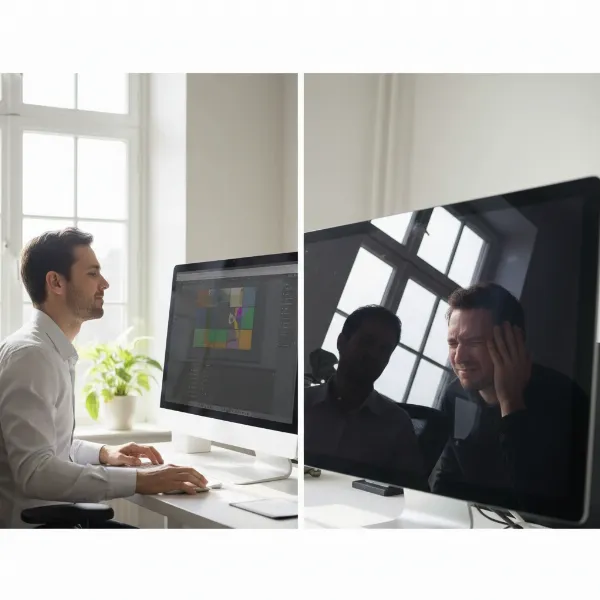 A person comfortably working on a matte computer monitor in a bright room with a large window, contrasting with a person squinting at a glossy monitor in a similarly lit room, showing reflections.
Conclusion
The debate between matte and glossy Computer Monitors is less about identifying a single “superior” option and more about understanding which display best complements your unique viewing environment and usage habits. Matte screens excel in brightly lit rooms, providing a glare-free experience that prioritizes eye comfort and consistent visibility, albeit with a slight trade-off in raw image vibrancy. Glossy screens, on the other hand, offer stunning clarity, richer colors, and deeper blacks, making them ideal for meticulously controlled, dim lighting conditions where their reflective nature won’t pose a distraction.
Before making your next purchase, take a moment to assess your room. Are you surrounded by windows or bright overhead lights, or do you prefer a dedicated, darkened space? Your environment holds the key to unlocking the best possible visual experience. Which screen type resonates most with your daily computing reality?
Frequently Asked Questions
Is a matte screen better for eye strain?
Yes, matte screens are generally better for reducing eye strain because their anti-glare coating diffuses ambient light, preventing harsh reflections and glare from directly hitting your eyes. This leads to a more comfortable viewing experience, especially during prolonged use.
Can I make a glossy screen less reflective?
You can mitigate reflections on a glossy screen by controlling your room’s lighting. This includes using blackout curtains, positioning your monitor away from direct light sources like windows or lamps, and employing bias lighting behind the monitor to balance screen brightness with ambient light.
Are all matte coatings the same?
No, not all matte coatings are identical. Some monitors feature more “aggressive” matte finishes that offer excellent glare reduction but might introduce a more noticeable grain or haze. Others have lighter matte coatings that strike a better balance between reflection reduction and maintaining image clarity.