In the dynamic world of display technology, new features constantly emerge, promising to elevate your viewing experience. Among the most talked-about advancements is High Dynamic Range (HDR), a technology that aims to deliver a more lifelike and immersive image. But with various standards and performance tiers, understanding HDR on computer monitors can be complex. Is it merely a marketing buzzword, or does it truly offer a worthwhile upgrade for your setup?
This comprehensive guide will break down what HDR means for computer monitors, how it works, its advantages and disadvantages, and ultimately help you determine if investing in an HDR monitor aligns with your needs and budget.
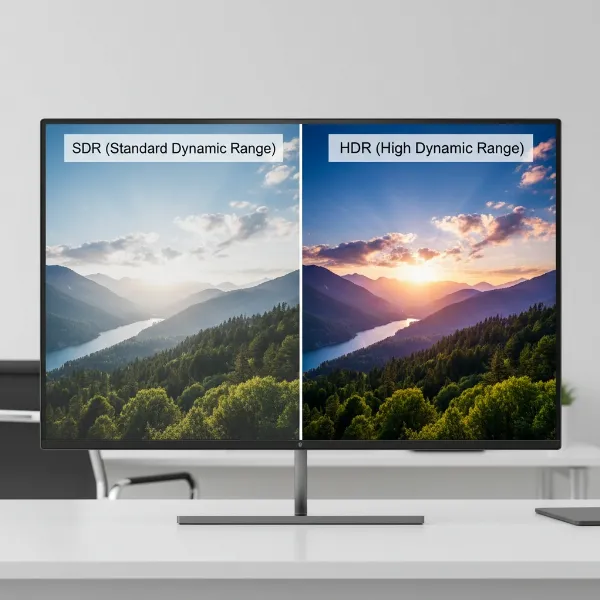 Side-by-side comparison of standard dynamic range versus high dynamic range on a computer monitor.
What Exactly is HDR on a Computer Monitor?
High Dynamic Range, or HDR, is a display technology that fundamentally changes how images and videos are presented on your screen. Unlike Standard Dynamic Range (SDR), which has been the norm for decades, HDR expands the range of colors, contrast, and brightness a monitor can display. This results in an image that more closely mimics what the human eye perceives in the real world.
The core difference lies in the capability to render details in both the darkest shadows and the brightest highlights of a scene simultaneously. With HDR, vibrant colors appear more vivid and true-to-life, while the contrast between light and dark elements becomes significantly more pronounced. This enhancement leads to a more realistic and visually engaging experience, whether you are gaming, watching movies, or engaging in content creation.
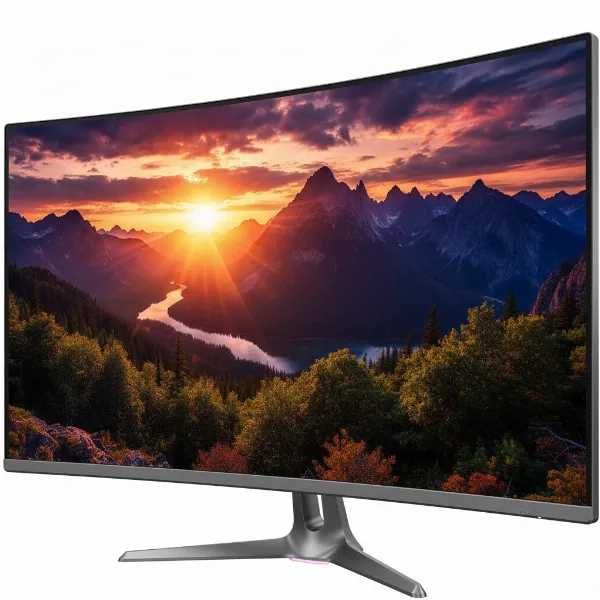 A close-up of a computer monitor displaying an incredibly vibrant and high-contrast HDR image.
Key Elements of HDR
For a computer monitor to deliver a true HDR experience, several key technical elements must be in play:
- Brightness (Luminance): HDR monitors achieve much higher peak brightness levels compared to SDR displays, often exceeding 400 nits and reaching up to 1000 nits or more. This allows highlights, like explosions in a game or reflections on water, to pop with stunning intensity.
- Contrast Ratio: This refers to the ratio between the brightest white and the darkest black a monitor can produce. HDR significantly widens this ratio, enabling deeper, richer blacks and brighter, more impactful whites, which are crucial for rendering fine details in diverse lighting conditions.
- Color Gamut: HDR utilizes a wider range of colors, typically covering color spaces like DCI-P3, which is much larger than the sRGB standard used by most SDR content. This expanded gamut allows for billions of colors, ensuring smoother gradients and more accurate, vibrant hues.
- Bit Depth: While SDR commonly uses 8-bit color (displaying 16.7 million colors), true HDR typically requires 10-bit color, enabling the display of over 1 billion colors. This greater bit depth helps eliminate color banding and provides seamless transitions between shades.
How Does HDR Technology Work?
The magic of HDR lies in its ability to manipulate light and color more intelligently than SDR. For a monitor to truly showcase HDR content, it needs advanced hardware capabilities.
Local Dimming
One of the most crucial technologies for achieving proper HDR on LED-backlit LCD monitors is local dimming. Since LCD panels cannot turn individual pixels completely off, local dimming backlight systems divide the screen into zones.
- Full-Array Local Dimming (FALD): Considered the gold standard for LCDs, FALD systems feature an array of LEDs directly behind the LCD panel, allowing for precise control over thousands of individual zones. This enables specific areas of the screen to be dimmed or brightened independently, resulting in superior contrast and black levels.
- Edge-Lit Local Dimming: Less effective than FALD, edge-lit systems have LEDs placed along the edges of the screen. While they can offer some improvement over traditional backlights, they often suffer from “blooming” or “haloing” effects, where light spills into darker areas, diminishing the HDR impact.
Panel Technologies
The underlying panel technology of a monitor plays a significant role in its HDR performance.
- OLED (Organic Light-Emitting Diode): OLED monitors are renowned for their exceptional HDR capabilities because each pixel emits its own light and can be individually turned off. This “per-pixel dimming” results in perfect blacks and infinite contrast ratios, making them ideal for HDR content.
- Mini-LED: A newer LCD backlight technology, Mini-LED uses thousands of tiny LEDs to create hundreds or even thousands of local dimming zones. This provides much more granular control over brightness and contrast than traditional FALD LCDs, bringing them closer to OLED performance for HDR, often with higher peak brightness.
- Standard LCD (IPS, VA, TN): While many standard LCD monitors claim HDR support, their performance can vary widely. Monitors without sufficient local dimming or peak brightness may only offer a nominal HDR experience, sometimes making content appear washed out.
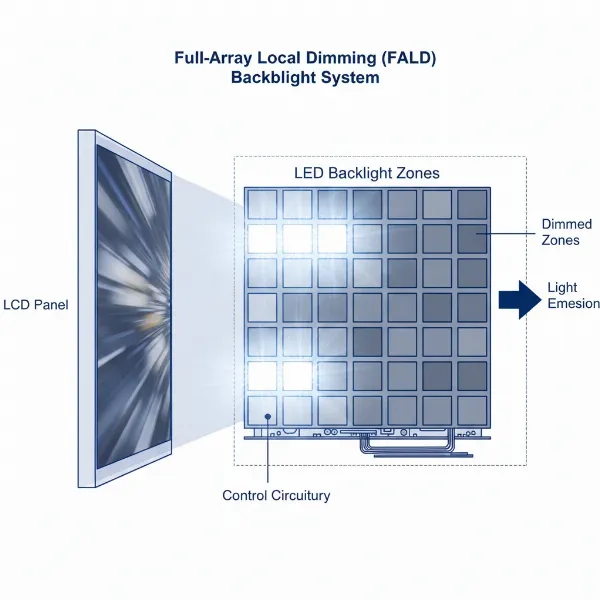 Diagram illustrating full-array local dimming technology with multiple LED backlight zones on an LCD monitor.
Understanding HDR Standards and Certifications
Navigating the world of HDR can be confusing due to various standards and certifications. These exist to provide consumers with an indication of a monitor’s HDR capability, though not all are created equal.
VESA DisplayHDR
The Video Electronics Standards Association (VESA) created the DisplayHDR certification to standardize HDR performance on LCD monitors. These tiers are based on peak brightness, black levels, color gamut coverage, and local dimming requirements.
- DisplayHDR 400: This is the entry-level certification, requiring a peak brightness of 400 nits and typically no local dimming or very basic edge-lit dimming. Monitors at this level often provide a minimal HDR improvement over SDR, and some users find it underwhelming.
- DisplayHDR 600: Monitors with this certification offer a noticeable step up, with 600 nits peak brightness and often some form of local dimming. This level generally provides a more impactful HDR experience.
- DisplayHDR 1000: These monitors deliver a truly premium HDR experience, boasting 1000 nits peak brightness and robust local dimming, producing impressive contrast and dazzling highlights.
- DisplayHDR True Black (400, 500): Specifically designed for OLED and similar emissive displays, these certifications focus on incredibly deep black levels, measured in absolute luminance, providing superior contrast in dark scenes even at lower peak brightness levels than their LCD counterparts.
Other HDR Formats
Beyond VESA DisplayHDR, other HDR formats are crucial for content compatibility.
- HDR10: This is the most prevalent open HDR standard, supported by virtually all HDR monitors, TVs, and content. It uses static metadata, meaning brightness and color information are applied consistently across an entire film or game.
- Dolby Vision & HDR10+: These are more advanced, proprietary HDR formats that use dynamic metadata. This allows brightness and color information to be adjusted scene-by-scene or even frame-by-frame, leading to a more optimized and consistent HDR presentation. While common on TVs, they are less frequently found on Computer Monitors.
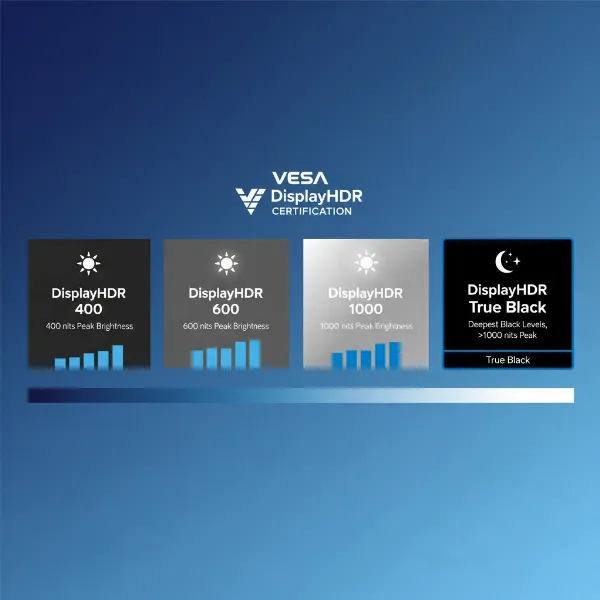 A graphic showing various VESA DisplayHDR certification logos and their respective brightness levels.
The Benefits of HDR: Why It Matters
When HDR is implemented correctly, the visual benefits are undeniable, transforming your viewing experience.
Unparalleled Visual Fidelity
HDR brings a level of realism and depth that SDR simply cannot match. The expanded contrast ratio allows you to discern intricate details in both the brightest sunlit areas and the deepest shadows, adding texture and dimensionality to images. Colors explode with greater vibrancy and accuracy, making scenes feel more lifelike and engaging. This fidelity is particularly noticeable in high-quality video content and professional photo editing, where color accuracy is paramount.
Immersive Gaming Experiences
For gamers, HDR can be a game-changer, literally. Supported games rendered in HDR offer a significantly more immersive experience. The richer colors and starker contrast create more dynamic environments, making virtual worlds feel more realistic and alive. Imagine the blinding glare of a digital sun, the subtle shadows in a dark cave, or the intense glow of energy effects – all are rendered with enhanced detail and impact through HDR. Many modern blockbuster titles offer robust HDR support, allowing players to fully appreciate the stunning visuals game developers intended.
 A gamer playing a visually stunning HDR game on a large computer monitor in a dimly lit room.
Enhanced Media Consumption
Whether you’re streaming your favorite shows, watching 4K Blu-rays, or browsing high-resolution photography, HDR elevates media consumption. Movies and series mastered in HDR reveal details that were previously lost, especially in cinematic scenes with extreme lighting conditions. The expanded color palette ensures that everything from lush landscapes to nuanced skin tones is rendered with greater accuracy and depth, providing a premium viewing experience that feels closer to a cinema.
The Challenges and Drawbacks of HDR Monitors
Despite its promises, HDR on monitors isn’t without its complexities and potential pitfalls. Understanding these drawbacks is key to making an informed decision.
The “Fake HDR” Dilemma
One of the biggest issues in the monitor market is the prevalence of displays that claim “HDR support” but lack the necessary hardware to deliver a genuine HDR experience. These monitors might accept an HDR signal but often have insufficient peak brightness, poor contrast ratios, or no effective local dimming. The result can be an image that looks washed out, dull, or even worse than SDR content, leading to consumer disappointment. This is why relying solely on the “HDR” label without considering VESA DisplayHDR certification (preferably DisplayHDR 600 or higher) or specific panel characteristics can be misleading.
Software Compatibility and Windows HDR Issues
While HDR content and hardware have advanced, software compatibility can still be a hurdle. Getting HDR to work flawlessly on a PC, especially with Windows, can sometimes be buggy. Users frequently report issues with non-HDR content appearing washed out when Windows HDR is enabled, or problems with screenshots appearing blown out. While improvements are continually being made, these inconsistencies can disrupt the user experience, leading some to prefer sticking with SDR for general desktop use.
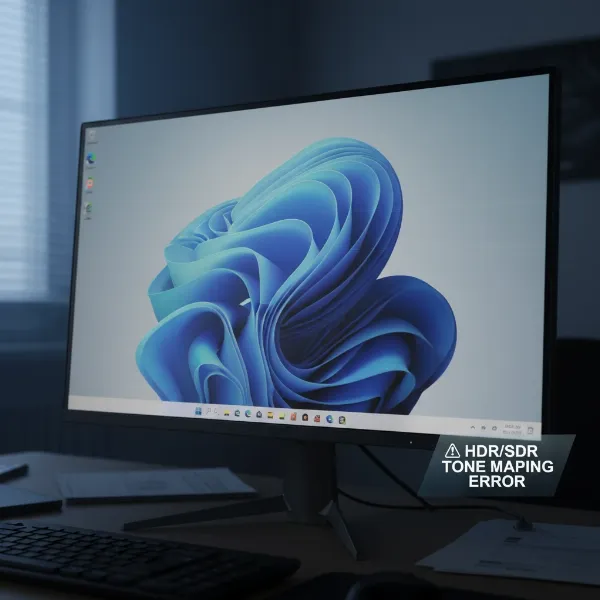 A computer monitor screen displaying a visibly washed-out image, representing common software compatibility issues with HDR.
Cost Considerations
True HDR monitors, particularly those with high-tier VESA DisplayHDR certifications (1000 or True Black) and premium panel technologies like OLED or Mini-LED, come at a significantly higher price point. The advanced backlighting systems, higher brightness capabilities, and wider color gamuts require more sophisticated components, which translates to a greater investment. Budget-conscious consumers might find that the cost-to-performance ratio of entry-level HDR monitors doesn’t justify the expense.
Content Availability
While HDR content is growing, it’s not ubiquitous. You’ll need compatible games, movies, streaming services, or applications to truly benefit from an HDR monitor. If your primary use cases don’t involve a lot of HDR-supported media, then the enhanced capabilities of an HDR monitor might go largely unused, making the investment less impactful. Both your monitor and the content source need to support HDR for it to work.
Factors to Consider When Buying an HDR Computer Monitor
Choosing the right HDR monitor requires careful consideration beyond just the “HDR” label. Here are the key factors to evaluate:
- VESA DisplayHDR Certification Level: Aim for at least DisplayHDR 600 for a noticeable improvement. DisplayHDR 1000 and DisplayHDR True Black (for OLED) offer the best experiences. Avoid DisplayHDR 400 if true HDR is your priority, unless the monitor has other exceptional qualities.
- Panel Type:
- OLED: Delivers the best contrast and black levels for HDR due to per-pixel illumination. Excellent for movies and immersive gaming.
- Mini-LED: Offers outstanding brightness and numerous local dimming zones, providing a near-OLED HDR experience on LCD panels.
- IPS/VA (with FALD): Good IPS or VA panels with Full-Array Local Dimming can provide respectable HDR, though they may still exhibit some blooming.
- Peak Brightness and Local Dimming Zones: Higher peak brightness (e.g., 600 nits+) combined with more local dimming zones (for LCDs) will yield a superior HDR picture. The more zones, the finer the control over light and shadow.
- Color Gamut Coverage (DCI-P3): Look for monitors that cover a significant portion of the DCI-P3 color space (e.g., 90% or more) to ensure a wide and accurate color palette for HDR content.
- Intended Use:
- Gaming: Fast response times and high refresh rates are crucial, alongside good HDR. OLED and high-end Mini-LED are often preferred.
- Content Creation: Color accuracy and wide gamut coverage are paramount. Professional-grade HDR monitors often provide calibration options.
- General Use: For everyday tasks, a moderately good HDR monitor might suffice, but if Windows HDR bugs annoy you, sticking to SDR for desktop use might be necessary.
Is HDR on Monitors Truly Worth the Investment?
The question of whether HDR on monitors is “worth it” doesn’t have a simple yes or no answer. It depends heavily on the quality of the HDR implementation, your specific use cases, and your budget.
When HDR Shines
HDR is absolutely worth the investment when you opt for a monitor with proper implementation. This typically means a high-end display with at least a DisplayHDR 600 certification, excellent local dimming (FALD or Mini-LED), or an OLED panel. In such cases, the increase in contrast, the depth of blacks, the brilliance of highlights, and the richness of colors can be truly transformative, offering a visual feast for supported games and movies. For those who prioritize cinematic immersion or competitive gaming with stunning visuals, a top-tier HDR monitor provides a significant upgrade that genuinely enhances the experience.
 A high-end computer monitor showcasing a breathtaking HDR image with exceptional color and contrast, emphasizing quality.
When to Stick with SDR
Conversely, for budget-oriented setups or monitors with only entry-level HDR (like basic DisplayHDR 400 without local dimming), the benefits are often minimal, if not detrimental. Poorly implemented HDR can lead to a flat, washed-out image that looks inferior to well-calibrated SDR. If your primary activities are web browsing, productivity tasks, or playing older games that don’t support HDR, then investing heavily in this technology might not yield the desired return. In these scenarios, a high-quality SDR monitor often provides a more consistent and satisfying experience for less money.
Ultimately, HDR done right offers a remarkable visual enhancement. However, it’s crucial to research and choose a monitor that genuinely delivers on the promise of High Dynamic Range, rather than just bearing the label.
Frequently Asked Questions
What is the minimum DisplayHDR level for a good experience?
For a noticeably good HDR experience, it’s generally recommended to look for monitors with at least DisplayHDR 600 certification. Displays with DisplayHDR 400 often provide only a marginal improvement over SDR.
Does HDR affect monitor refresh rate?
No, HDR itself does not directly affect your monitor’s refresh rate. Refresh rate and HDR are independent specifications. However, processing HDR content can sometimes demand more from your GPU, which might indirectly impact frame rates in games.
Can I use HDR for everyday tasks?
You can use HDR for everyday tasks, but Windows’ HDR implementation can sometimes make non-HDR content (like web pages or standard desktop applications) appear washed out. Some users prefer to toggle HDR off for general desktop use and only enable it for compatible content.
Why does Windows HDR make things look washed out?
Windows HDR sometimes struggles with proper tone mapping for SDR content when HDR mode is enabled globally. This can result in SDR elements appearing less vibrant or having an incorrect color balance compared to when HDR is off.
What’s the difference between HDR10 and Dolby Vision on monitors?
HDR10 is a widely supported open standard using static metadata, applying consistent HDR settings across content. Dolby Vision (and HDR10+) uses dynamic metadata, allowing for scene-by-scene or frame-by-frame optimization, which can lead to a more refined HDR picture. Dolby Vision is less common on PC monitors than TVs.
Are OLED monitors always better for HDR?
OLED monitors offer exceptional HDR performance due to their per-pixel dimming, resulting in perfect blacks and infinite contrast. While they might not always achieve the highest peak brightness of some Mini-LED LCDs, their superior contrast often makes for a more impactful HDR experience, especially in darker scenes.