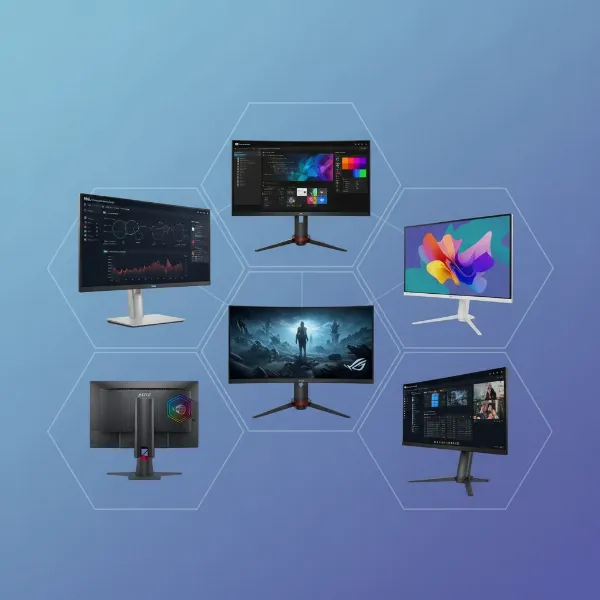
In the evolving landscape of display technology, achieving truly immersive visuals hinges on a critical innovation: local dimming. This technology fundamentally transforms how a computer monitor displays images, delivering breathtaking contrast and vibrant HDR content. For anyone seeking deeper blacks, brighter highlights, and a more dynamic viewing experience, understanding local dimming is key. Today, Mini-LED technology stands at the forefront of this revolution, pushing the boundaries of what LED-backlit LCD monitors can achieve.
What are Local Dimming Zones?
At its core, local dimming refers to the ability of a display to control the brightness of its backlight in specific, localized areas or “zones” across the screen. Traditional LCDs illuminate the entire screen uniformly, meaning even dark scenes would have a global backlight, resulting in grayish blacks and a lack of true depth. Local dimming was developed to overcome this inherent limitation, allowing parts of the screen that should be dark to dim considerably, while other parts that need to be bright can shine intensely. This granular control over illumination dramatically improves a monitor’s contrast ratio, making dark colors appear genuinely black and bright colors brilliantly vivid.
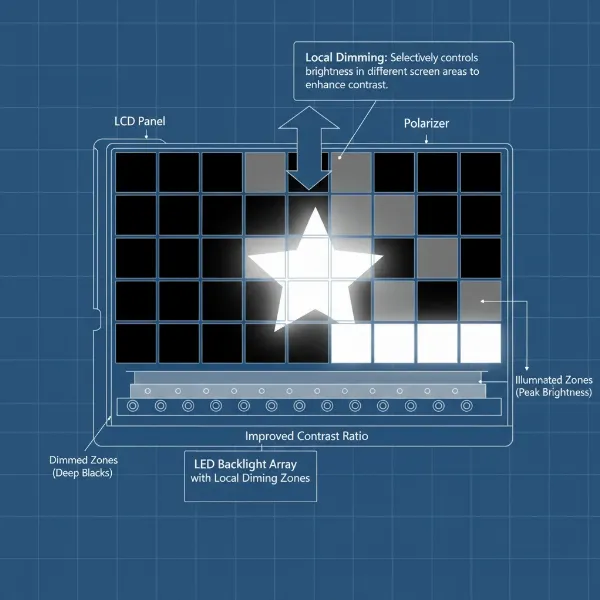 A diagram showing a computer monitor backlight divided into multiple local dimming zones.
How Local Dimming Works
Local dimming technology functions by analyzing the incoming video signal in real-time. Sophisticated algorithms identify areas of the screen that require more light and areas that demand less. The display’s backlight, comprised of many individual LEDs, is then divided into these controllable zones. When a dark scene is displayed, the LEDs in the corresponding zones dim or even turn off, while LEDs in zones showing bright objects remain fully illuminated. This independent adjustment across hundreds or even thousands of zones allows for a dynamic range that was once impossible for standard LCD technology. The result is a much more impactful image, especially noticeable in high dynamic range (HDR) content, where the extremes of light and dark are crucial for realism.
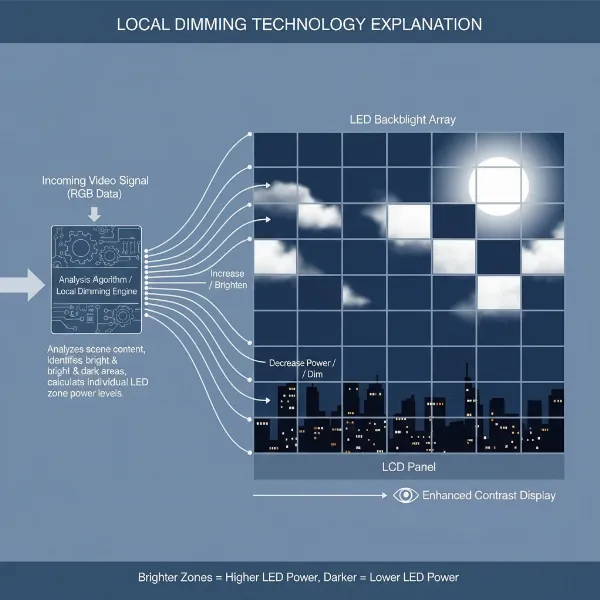 Flowchart or diagram depicting how local dimming analyzes video signals and adjusts LED brightness.
Evolution of Local Dimming Technologies
The journey of local dimming has seen several advancements, each bringing greater precision to picture quality.
Edge-Lit Local Dimming
Early implementations of local dimming, known as edge-lit, placed LEDs along the perimeter of the screen. While more cost-effective and allowing for thinner monitor designs, this method offered limited control. The light from the edges had to be diffused across larger areas, meaning fewer dimming zones. This often resulted in less effective black levels and noticeable “blooming” or “halo effects,” where light from bright objects would bleed into adjacent dark areas.
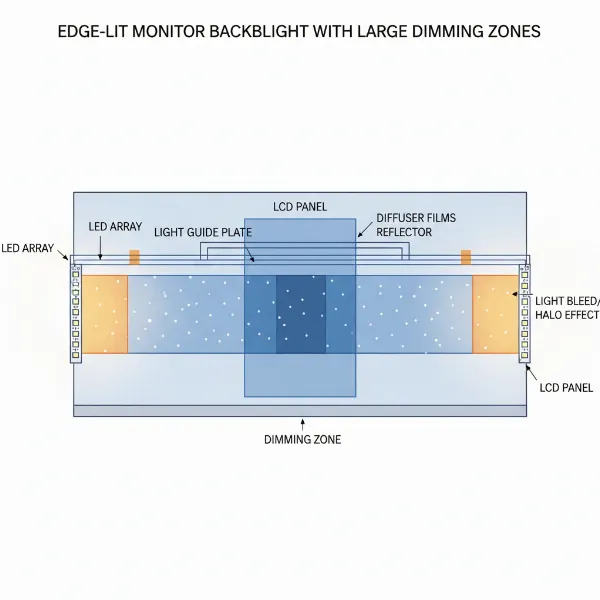 Diagram of an edge-lit computer monitor showing LEDs along the perimeter and light diffusion.
Direct-Lit and Full-Array Local Dimming (FALD)
A significant improvement came with direct-lit backlighting, where LEDs are positioned directly behind the entire screen. When this direct backlight is divided into independently controllable sections, it becomes what is known as Full-Array Local Dimming (FALD). FALD monitors feature a grid of LEDs across the entire panel, offering a substantial increase in dimming zones compared to edge-lit designs. This direct placement and zonal control allow for much finer management of light, leading to deeper blacks and improved contrast. FALD is highly valued in computer monitors, particularly for gaming and content creation, as it delivers more immersive visuals with higher dynamic range.
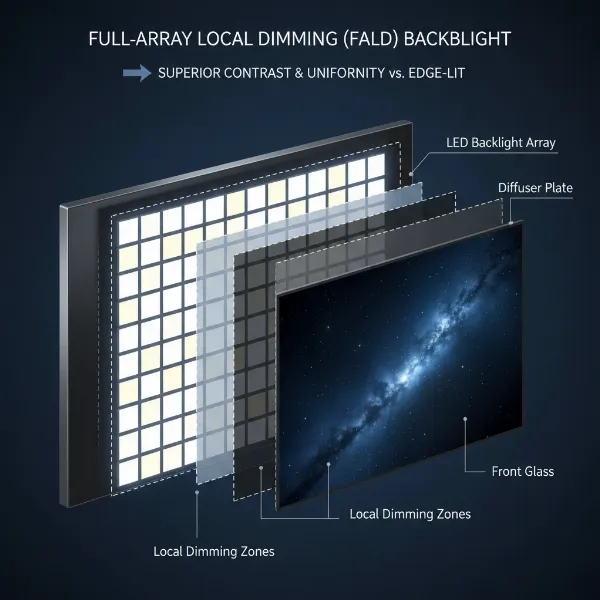 Diagram comparing direct-lit and FALD backlight with a grid of LEDs.
The Rise of Mini-LED Technology
Mini-LED represents the pinnacle of FALD technology, taking the concept of localized backlight control to an unprecedented level. Instead of traditional-sized LEDs, Mini-LED displays use thousands of microscopic LEDs, typically ranging from 100-200 micrometers. This miniaturization allows manufacturers to pack a far greater number of LEDs into the same space, creating hundreds or even thousands of individual dimming zones.
A Mini-LED computer monitor can feature anywhere from several hundred to over 2,000 or even tens of thousands of dimming zones. This sheer volume of zones provides incredibly precise control over the backlight. Each tiny “mini-flashlight” can be dimmed or brightened with extreme accuracy, allowing the monitor to render intricate details in both the darkest shadows and the brightest highlights of an image. This advanced zonal control is a real upgrade to the traditional display backlighting, transforming the viewing experience.
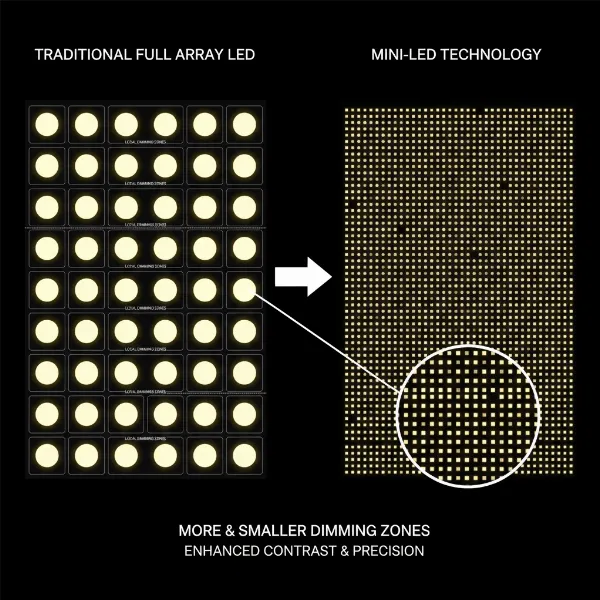 Close-up comparison showing traditional LEDs vs. thousands of microscopic Mini-LEDs in a backlight.
Why Mini-LED Matters: Key Advantages for Computer Monitors
Mini-LED technology offers a compelling suite of advantages that significantly enhance the performance of computer monitors.
Exceptional Contrast and Deeper Blacks
With thousands of dimming zones, Mini-LED monitors can achieve near-perfect black levels by selectively turning off the backlight in dark areas. This leads to a dramatic improvement in contrast, making images appear more three-dimensional and realistic. When a night sky is displayed, for instance, the stars can twinkle brightly against a backdrop of truly inky blackness.
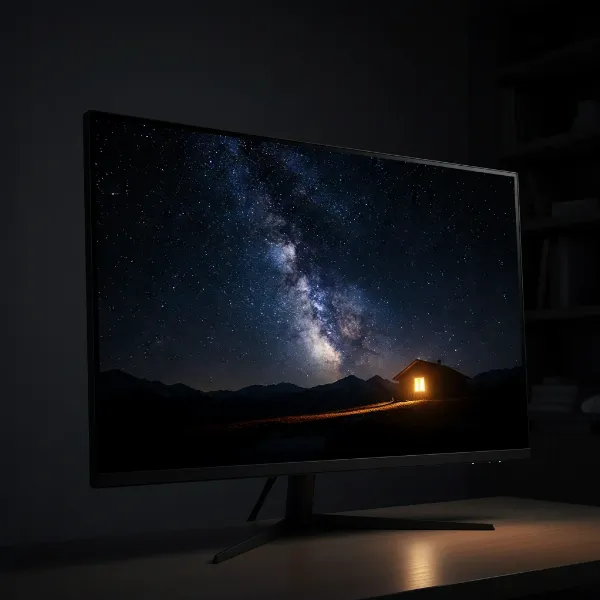 A high-contrast image displayed on a Mini-LED monitor, showcasing deep blacks and bright highlights.
Brighter Highlights and Superior HDR Performance
Mini-LED monitors excel at delivering incredibly high peak brightness levels. This, combined with precise local dimming, makes them ideal for High Dynamic Range (HDR) content. HDR requires a display to reproduce a wider range of brightness levels, and Mini-LED’s ability to create both intensely bright highlights and profoundly dark shadows simultaneously brings HDR content to life with stunning realism and detail.
Reduced Blooming and Enhanced Clarity
While some blooming (light bleeding into dark areas) can still occur with Mini-LED, the drastically increased number of smaller dimming zones significantly minimizes this artifact. The finer control ensures that bright objects appear sharper and more defined against dark backgrounds, leading to enhanced overall clarity and a cleaner picture.
Improved Power Efficiency
Despite offering higher brightness and more precise control, Mini-LED technology can also contribute to better energy efficiency. By precisely dimming or turning off unused backlight zones, the monitor consumes less power, especially when displaying darker content. This is beneficial for both the environment and your electricity bill.
Longevity and Burn-in Resistance
Unlike self-emissive technologies like OLED, Mini-LED monitors utilize an LCD panel with an LED backlight, making them immune to the risk of permanent burn-in from static images or UI elements. This makes Mini-LED monitors a robust and long-lasting choice, especially for users who spend long hours on tasks with static content, such as productivity work or gaming with persistent HUDs.
Gaming and Professional Applications
For gamers, Mini-LED monitors deliver vibrant colors, fast response times, and exceptional contrast, creating an immersive and competitive edge. The superior HDR performance highlights details in shadowy corners and bright explosions. Content creators, designers, and video editors benefit from the enhanced color accuracy and dynamic range, ensuring their work is displayed with the utmost fidelity.
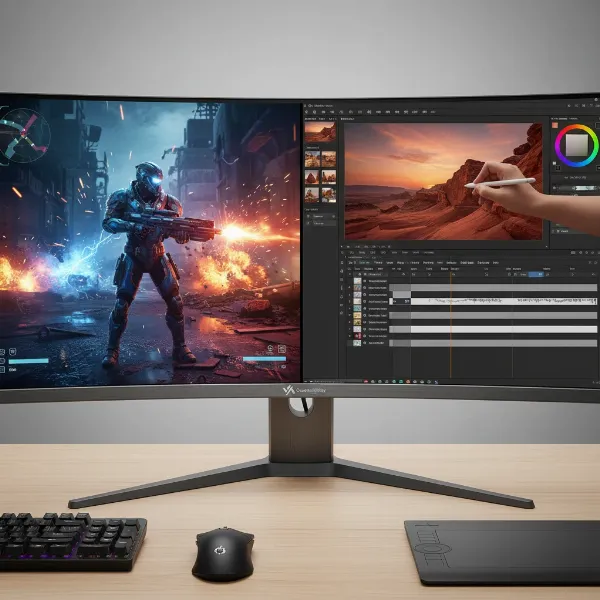 A person using a Mini-LED monitor for gaming or professional graphic design.
Mini-LED vs. OLED: A Closer Look
The debate between Mini-LED and OLED often comes down to their fundamental display technologies. While both offer exceptional picture quality, they achieve it differently and excel in distinct areas.
OLED (Organic Light-Emitting Diode) displays are self-emissive, meaning each individual pixel generates its own light and can be turned on or off independently. This results in perfect blacks and infinite contrast, as pixels in dark areas can be truly off. OLED also boasts incredibly fast response times.
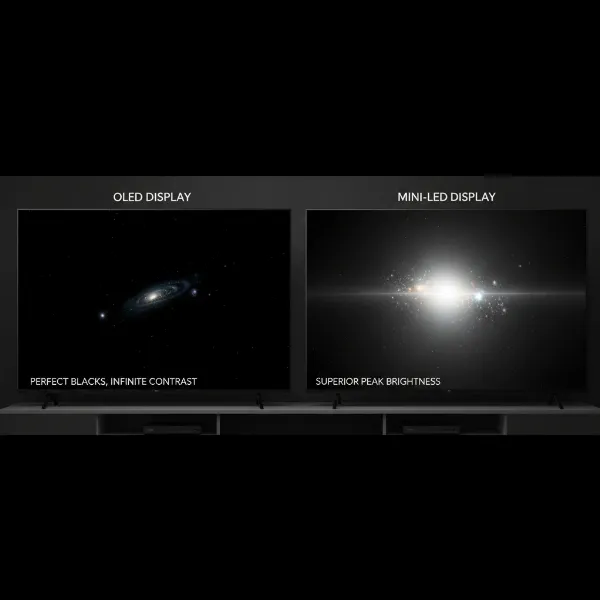 Side-by-side comparison of Mini-LED and OLED displays, highlighting key visual differences.
Mini-LED, on the other hand, is an advanced form of LED-backlit LCD. While it cannot achieve the pixel-level control of OLED, its thousands of dimming zones provide a very close approximation of perfect blacks and incredible contrast. Mini-LED often surpasses OLED in peak brightness, making it a superior choice for well-lit environments and delivering eye-searing HDR highlights. Additionally, Mini-LED monitors do not suffer from burn-in risk and are often more affordable in larger screen sizes. The choice between them often depends on prioritizing perfect blacks and response time (OLED) versus extreme brightness, burn-in resistance, and value (Mini-LED).
Understanding Local Dimming Algorithms
The physical hardware of Mini-LED zones is only half the story; the other crucial component is the local dimming algorithm. This software-driven intelligence determines how the monitor interprets the image and instructs each dimming zone to adjust its brightness. A sophisticated algorithm is paramount for minimizing artifacts like blooming and ensuring that shadow detail is preserved rather than crushed into black. A poorly implemented algorithm, even with many zones, can lead to a less satisfying picture, demonstrating that both the quantity of zones and the quality of their control are vital for optimal performance.
 Abstract representation of an algorithm processing image data to control local dimming zones.
“The raw power of thousands of Mini-LED zones means little without intelligent algorithms to manage them. The software is what truly unlocks the potential for breathtaking contrast and vibrant HDR on a modern computer monitor.” – Dr. Elena Petrova, Display Technology Engineer
Comparison Table: Local Dimming Types for Computer Monitors
| Feature | Edge-Lit LED | Full-Array Local Dimming (FALD) | Mini-LED Local Dimming | OLED (Reference) |
|---|---|---|---|---|
| Backlight Type | LEDs along edges | Grid of larger LEDs behind panel | Grid of thousands of tiny LEDs behind panel | Self-emissive pixels (no backlight) |
| Dimming Zones | Few (tens) | Moderate (hundreds) | Many (hundreds to thousands) | Infinite (each pixel is a zone) |
| Contrast | Moderate | Good to Very Good | Excellent | Perfect |
| Black Levels | Grayish blacks, noticeable light bleed | Deeper blacks, some blooming | Very deep blacks, minimal blooming | Perfect blacks (pixels off) |
| Peak Brightness | Moderate | Good | Excellent (often superior) | Very Good (can be limited compared to Mini-LED) |
| HDR Performance | Basic to Moderate | Good | Excellent | Excellent |
| Blooming/Halo | Often noticeable | Present but reduced | Significantly reduced | None (pixel-level control) |
| Cost | Lower | Mid-range | Higher-end | Premium |
| Burn-in Risk | None | None | None | Potential, especially with static content |
Mua Computer Monitor ở đâu?
Finding the right Mini-LED computer monitor involves exploring reputable retailers that specialize in electronics.
Các cửa hàng bán Computer Monitor uy tín
For those who prefer a hands-on experience or need immediate assistance, visiting large electronics stores can be beneficial. Retailers like Best Buy, Micro Center, or regional equivalents often have demonstration models where you can see the display quality firsthand. Sales associates can also provide advice and help you compare different models.
Mua Computer Monitor online
Online shopping offers the broadest selection and competitive pricing. Major e-commerce platforms such as Amazon, Newegg, B&H Photo Video, and direct manufacturer websites (e.g., Dell, HP, Samsung, LG, Asus, Acer) are excellent places to browse. Be sure to check return policies, warranty information, and read customer reviews to ensure a satisfactory purchase. Specialized tech review sites like RTINGS.com also offer in-depth analyses that can guide your decision.
Hướng dẫn chọn mua Computer Monitor phù hợp
Choosing the ideal Mini-LED computer monitor requires careful consideration of your specific needs and priorities.
Xác định nhu cầu sử dụng
First, define your primary use case. Are you a competitive gamer who prioritizes high refresh rates and low input lag? A content creator needing superb color accuracy and HDR for video editing? Or a professional requiring crisp text and ample screen real estate for productivity? Your usage will dictate the necessary features.
Xác định ngân sách
Mini-LED technology generally falls into the premium segment of computer monitors. Establish a realistic budget range, as prices can vary significantly based on screen size, resolution, refresh rate, and the number of local dimming zones.
Tìm hiểu thông tin sản phẩm
Research specific models that fit your criteria. Pay close attention to the number of dimming zones, peak brightness (often measured in nits), HDR certification (e.g., VESA DisplayHDR 1000 or higher), and panel type (IPS, VA, etc., each with its own characteristics).
So sánh các sản phẩm
Don’t settle for the first option. Compare several Mini-LED monitors side-by-side, focusing on their specifications, features, and price points. Look for comparisons from trusted tech reviewers.
Đọc đánh giá sản phẩm
Customer and expert reviews provide invaluable real-world insights into a monitor’s performance, potential quirks, and overall user satisfaction. Pay attention to comments regarding blooming, black uniformity, and the effectiveness of the local dimming algorithm.
Conclusion
Local dimming zones, particularly those powered by Mini-LED technology, represent a significant leap forward in display performance for computer monitors. By offering unparalleled control over backlight illumination, Mini-LED delivers exceptional contrast, astonishing brightness, and truly captivating HDR experiences. While OLED remains a formidable contender with its perfect blacks, Mini-LED provides a compelling alternative, especially for those who prioritize peak brightness, longevity, and a balance of performance and value. As the technology continues to evolve, Mini-LED is set to redefine our expectations of visual fidelity on the desktop. Are you ready to witness the next generation of visual excellence on your Computer Monitor?
Frequently Asked Questions
What is the ideal number of local dimming zones for a Mini-LED monitor?
While there’s no single “ideal” number, more dimming zones generally translate to better picture quality, greater contrast, and reduced blooming. High-end Mini-LED monitors often feature hundreds or even thousands of zones, providing incredibly precise control over the backlight for a superior visual experience.
Does Mini-LED eliminate blooming entirely?
Mini-LED significantly reduces blooming (light halos around bright objects against dark backgrounds) compared to traditional FALD or edge-lit monitors. However, it may not entirely eliminate it, as it still relies on zones rather than individual pixel control like OLED. The effectiveness also heavily depends on the quality of the local dimming algorithm.
Is Mini-LED good for professional content creation?
Absolutely. Mini-LED monitors offer high peak brightness, excellent contrast, and often superb color accuracy, making them highly suitable for professional content creation, including video editing, graphic design, and photography, especially when working with HDR content.
What is the lifespan of a Mini-LED computer monitor?
Mini-LED monitors typically boast a long lifespan, often rated for 60,000 to 100,000 hours of use, which translates to 10-15 years of typical operation. Unlike OLED, they are not susceptible to permanent burn-in, making them a durable choice for long-term use.
How does Mini-LED compare to traditional LED monitors?
Mini-LED is a drastic improvement over traditional LED monitors. Traditional LED monitors often use a global backlight or a very limited number of zones, leading to washed-out blacks and poor contrast. Mini-LED, with its thousands of tiny LEDs and precise local dimming, offers vastly superior contrast, deeper blacks, brighter highlights, and better HDR performance.
Is Mini-LED better than OLED for gaming?
For gaming, both Mini-LED and OLED are excellent. OLED offers perfect blacks and instantaneous pixel response. Mini-LED counters with significantly higher peak brightness, making it better for HDR gaming and well-lit rooms, along with no burn-in risk for static HUD elements, which can be a key advantage for certain gamers. The “better” choice depends on individual priorities.